
Guide
Inter-Component Protocol
Specifies the communication protocols used between Land components: gRPC service definitions (Vine protocol), Tauri IPC mechanism, Spine extension coordination protocol, and connection lifecycle management.
Inter-Component Protocol
This document specifies the communication protocols used between Land components. It covers the gRPC service definitions (Vine protocol), the Tauri IPC mechanism, the Spine extension coordination protocol, and the connection lifecycle management.
Table of Contents
- Protocol Overview
- Tauri IPC
- Vine gRPC Protocol
- Spine Extension Protocol
- Connection Lifecycle
- Health Monitoring
- Protocol Buffer Definitions
- Security
- Related Documentation
Protocol Overview 🔌
Land uses three communication protocols operating at different abstraction levels:
| Protocol | Transport | Layer | Components | Purpose |
|---|---|---|---|---|
Tauri IPC | In-process IPC | Application | Wind/Sky <-> Mountain | UI-backend communication |
gRPC (Vine) | TCP localhost | Service | Cocoon <-> Mountain, Air <-> Mountain | Inter-service RPC |
Spine | gRPC + ActionEffect | Extension | Cocoon -> Mountain | Extension host coordination |
Protocol Stack

Tauri IPC 🎮
TierIPC Runtime Routing
The TierIPC environment variable controls how Wind and Output route Tauri IPC calls at runtime. No rebuild is required to switch tiers.
| Value | Behaviour |
|---|---|
Mountain | All calls route to Mountain (default) |
NodeDeferred | Mountain first; on miss or undefined result, falls back to Cocoon via cocoon:request bridge |
Node | All calls bypass Mountain and route directly to Cocoon via cocoon:request |
Individual subsystems have their own tier constants (e.g. TierTerminal, TierStorage, TierSearch) baked at compile time from .env.Land. A runtime shell export (e.g. export TierStorage=Node) overrides the baked value without a rebuild. The active tier for each subsystem is logged at boot by Mountain/Source/LandFixTier.rs.
Commands (Request-Response)
Wind invokes Mountain handlers through @tauri-apps/api invoke(). Each command maps to a registered Rust handler in Mountain.
Wind-side invocation:
import { invoke } from "@tauri-apps/api/core";

const content: Uint8Array = await invoke("read_file", {
	path: "/Users/user/Documents/example.ts",
});Mountain-side handler:
use tauri;

#[tauri::command]
async fn read_file(
    path: String,
    state: State<'_, AppState>
) -> Result<Vec<u8>, String> {
    let fs = state.file_system();
    fs.read_file(std::path::Path::new(&path))
        .await
        .map_err(|e| e.to_string())
}

fn main() {
    tauri::Builder::default()
        .invoke_handler(tauri::generate_handler![read_file])
        .run(tauri::generate_context!());
}
Command Catalog
All commands are dispatched through the single Tauri command MountainIPCInvoke with { method: string, params: any[] }. The method string corresponds to the channel wire name defined in Common/Source/IPC/Channel.rs.
Encryption
| Command | Parameters | Returns | Purpose |
|---|---|---|---|
encryption:encrypt | [plaintext: string] | string | AES-256-GCM encryption; key is SHA-256 of machine UUID, cached per-process |
encryption:decrypt | [ciphertext: string] | string | Symmetric decryption; used by extension context secrets API |
The encryption key is derived once per process in Encryption/Key.rs using SHA-256("Land-Encryption-v1" + machine_id). Returns an empty string on failure rather than throwing, so callers treat a corrupt blob as “no stored secret”.
File System
| Command | Parameters | Returns | Purpose |
|---|---|---|---|
file:watch | [path: string, options?] | void | Register a file watcher via FileWatcherProvider |
file:unwatch | [path: string] | void | Deregister a file watcher |
file:open | [path: string, opts?] | number | Open a file descriptor; fd is tracked in Mountain’s fd table |
file:close | [fd: number] | void | Close a tracked file descriptor |
file:stat | [path: string] | FileStat | Stat a path |
file:readFile | [path: string] | Uint8Array | Read file (VS Code native path) |
file:readdir | [path: string] | DirEntry[] | List directory entries |
file:writeFile | [path: string, content: Uint8Array] | void | Write file |
file:delete | [path: string, opts?] | void | Delete file or directory; fires $acceptDidDeleteFiles |
file:rename | [from: string, to: string] | void | Rename/move file; fires $acceptDidRenameFiles |
file:mkdir | [path: string] | void | Create directory; fires $acceptDidCreateFiles |
file:copy | [from: string, to: string] | void | Copy file |
file:cloneFile | [from: string, to: string] | void | Clone file (reflink where supported); fires $acceptDidCreateFiles |
file:realpath | [path: string] | string | Resolve symlinks |
file:exists | [path: string] | boolean | Check existence |
file:open / file:close are classified as high-frequency and short-circuit the Echo scheduler.
Terminal
| Command | Parameters | Returns | Purpose |
|---|---|---|---|
localPty:createProcess | [shellLaunchConfig, cols, rows, ...] | { id, pid } | Spawn a PTY process; returns its internal id and OS PID |
localPty:resize | [id, cols, rows] | void | Resize PTY via SIGWINCH |
localPty:attachToProcess | [id: number] | { id, pid } | Reconnect workbench to an existing live PTY after window reload |
localPty:detachFromProcess | [id: number] | void | Detach the workbench from a PTY without killing the process |
localPty:reviveTerminalProcesses | [states: TerminalState[]] | void | Re-spawn terminals from serialised state after reload; populates id-remap table |
localPty:shellExecutionStart | [{ id, commandLine, cwd }] | void | Fired by Sky on OSC 633 ;C (command output begins); forwards $acceptTerminalShellExecutionStart to Cocoon |
localPty:shellExecutionEnd | [{ id, commandLine, cwd, exitCode }] | void | Fired by Sky on OSC 633 ;D (command finished); fans out $acceptTerminalShellExecutionEnd and $acceptExecutedTerminalCommand to Cocoon |
localPty:freePortKillProcess | [port: number] | void | Find process owning a port (lsof) and SIGKILL it |
localPty:getDefaultShell | [] | string | Return the user’s default login shell path |
localPty:getEnvironment | [] | object | Return the login-shell environment variables |
localPty:getProfiles | [includeDetected?] | Profile[] | List available shell profiles |
terminal:create | [options] | { id } | Create a terminal tab (calls TerminalProvider) |
terminal:sendText | [id, text] | void | Write text to terminal PTY |
terminal:show | [id] | void | Reveal terminal tab in UI |
terminal:hide | [id] | void | Hide terminal tab |
terminal:dispose | [id] | void | Destroy terminal and PTY |
NativeHost
| Command | Purpose |
|---|---|
nativeHost:quit | Request graceful application quit |
nativeHost:exit | Exit with process code |
nativeHost:relaunch | Restart the application |
nativeHost:reload | Reload the webview |
nativeHost:openDevTools | Open Tauri/WebView developer tools |
nativeHost:toggleDevTools | Toggle developer tools visibility |
nativeHost:killProcess | Kill a process by PID |
nativeHost:installShellCommand | Install fiddee CLI symlink in /usr/local/bin |
nativeHost:uninstallShellCommand | Remove fiddee CLI symlink |
nativeHost:findFreePort | Find an available TCP port |
nativeHost:isPortFree | Check whether a specific port is free (real TCP bind check) |
nativeHost:resolveProxy | Read HTTPS_PROXY / HTTP_PROXY environment variables |
nativeHost:getEnvironmentPaths | Return home, appRoot, userData, temp and related paths |
nativeHost:isRunningUnderARM64Translation | Detect Rosetta 2 translation on macOS |
nativeHost:moveItemToTrash | Move a file to the OS trash |
nativeHost:showMessageBox | Show a native OS alert/confirm dialog |
nativeHost:showSaveDialog | Show a native save-file dialog |
nativeHost:showOpenDialog | Show a native open-file/folder dialog |
nativeHost:readClipboardText | Read text from clipboard |
nativeHost:writeClipboardText | Write text to clipboard |
nativeHost:readClipboardFindText | Read macOS find-pasteboard text |
nativeHost:writeClipboardFindText | Write macOS find-pasteboard text |
nativeHost:readClipboardBuffer | Read clipboard in a specific format (e.g. text/html) |
nativeHost:writeClipboardBuffer | Write clipboard in a specific format |
nativeHost:hasClipboard | Test whether clipboard contains data in a given format |
nativeHost:readImage | Read an image from clipboard as PNG bytes |
nativeHost:triggerPaste | Programmatically trigger a paste action in the focused element |
nativeHost:setMinimumSize | Set the window minimum size constraints |
nativeHost:positionWindow | Reposition or resize the window |
nativeHost:setRepresentedFilename | Set the macOS proxy-icon path in the window title bar |
nativeHost:getWindows | Return the list of open windows with product name and active document |
nativeHost:getOSColorScheme | Return the current OS light/dark/high-contrast scheme |
nativeHost:getOSProperties | Return OS name, version, architecture |
nativeHost:getOSStatistics | Return memory and CPU usage snapshot |
Language
| Command | Parameters | Returns | Purpose |
|---|---|---|---|
language:provideInlineCompletions | [uri, position, context] | InlineCompletion[] | Request inline completion items via LanguageFeatureProviderRegistry; used by Sky’s Monaco InlineCompletionsProvider |
language:getLanguages | [] | string[] | Return all registered Monaco language IDs |
Other Core Commands
| Command | Purpose |
|---|---|
commands:execute | Execute a registered VS Code command by ID |
configuration:get | Read a configuration value |
configuration:update | Write a configuration value |
storage:get / storage:set / storage:delete | Key-value storage backed by Mountain’s StorageProvider |
textFile:read / textFile:write / textFile:save | Editor working-copy surface |
output:create / output:append / output:appendLine | Output channel management |
notification:show / notification:showProgress | User-facing notifications |
quickInput:showQuickPick / quickInput:showInputBox | Quick-pick and input-box UI round-trips |
themes:getActive / themes:list / themes:set | Theme management |
workspaces:getFolders / workspaces:addFolder / workspaces:removeFolder | Workspace folder management |
decorations:get / decorations:set / decorations:clear | File decoration provider |
keybinding:add / keybinding:remove / keybinding:lookup | Keybinding registry |
lifecycle:getPhase / lifecycle:whenPhase | Workbench lifecycle phase queries |
model:open / model:get / model:updateContent / model:close | Text model management |
search:findFiles / search:findInFiles | File search (routes to Cocoon when TierSearch=Node) |
update:checkForUpdates / update:downloadUpdate / update:applyUpdate | Update service (all stubs; no update server) |
auth:getSessions / auth:createSession / auth:removeSession | Authentication (routes to Cocoon) |
tasks:executeTask / tasks:getTasks | Task execution (routes to Cocoon) |
scm:createSourceControl / scm:getSourceControls | Source control management |
debug:startDebugging / debug:getSessions / debug:addBreakpoints | Debug session management |
The full channel enum is defined in
Common/Source/IPC/Channel.rs(Rust) and mirrored inWind/Source/IPC/Channel.ts(TypeScript). Both must be kept in lockstep — adding a channel to one requires adding it to the other.
Events (Push from Mountain)
Mountain emits events that Wind/Sky listen to via @tauri-apps/api/event:
import { listen } from "@tauri-apps/api/event";

const unlisten = await listen("configuration-changed", (event) => {
	// event.payload contains the changed configuration keys
	updateLocalConfiguration(event.payload);
});
Event Catalog
| Event | Payload | Direction | Purpose |
|---|---|---|---|
configuration-changed | { keys: string[] } | Mountain -> Wind | Configuration updates |
extension-activated | { id: string } | Mountain -> Wind | Extension activation notification |
terminal-data | { id: number, data: string } | Mountain -> Wind | Terminal output streaming |
file-changed | { path: string, type: string } | Mountain -> Wind | File system watcher notification |
theme-changed | { theme: string } | Mountain -> Wind | Color theme change |
window-state-changed | { state: string } | Mountain -> Wind | Window maximize/minimize/fullscreen |
Serialization
Tauri IPC uses JSON serialization with the following conventions:
- Strings are UTF-8 encoded
- Numbers are JSON numbers (f64), deserialized to appropriate
Rusttypes - Binary data is
Vec<u8>/Uint8Array, serialized as JSON number arrays for small payloads, or via custom serializer for large files - Complex types are serialized through serde
Serialize/Deserializetraits
Vine gRPC Protocol 🏔️
Vine defines the gRPC service contracts for Mountain-Cocoon and Mountain-Air communication. The canonical definition lives at Element/Vine/Proto/Vine.proto. Mountain keeps a local sync’d copy at Element/Mountain/Proto/Vine.proto which its build.rs compiles directly.
Service Definitions
syntax = "proto3";

package Vine;

// Service running on the Mountain host, listening for requests from Cocoon.
service MountainService {
  // Generic request-response: Cocoon -> Mountain.
  rpc ProcessCocoonRequest(GenericRequest) returns (GenericResponse);
  // Fire-and-forget notification: Cocoon -> Mountain.
  rpc SendCocoonNotification(GenericNotification) returns (Empty);
  // Cancel a long-running operation.
  rpc CancelOperation(CancelOperationRequest) returns (Empty);
  // LAND-PATCH B7-S6 P2: bidirectional streaming channel.
  rpc OpenChannelFromCocoon(stream Envelope) returns (stream Envelope);
}

// Service running on the Cocoon sidecar, listening for requests from Mountain.
service CocoonService {
  // A generic request-response method for Mountain to call a function on Cocoon.
  rpc ProcessMountainRequest(GenericRequest) returns (GenericResponse);

  // A generic fire-and-forget method for Mountain to send a notification to Cocoon.
  rpc SendMountainNotification(GenericNotification) returns (Empty);

  // A method for Mountain to request that Cocoon cancel a long-running operation.
  rpc CancelOperation(CancelOperationRequest) returns (Empty);

  // LAND-PATCH B7-S6 P2: bidirectional streaming channel (mirror of
  // MountainService::OpenChannelFromCocoon). Mountain opens this
  // stream once per Cocoon connection; all subsequent traffic
  // multiplexes over it.
  rpc OpenChannelFromMountain(stream Envelope) returns (stream Envelope);

  // ==================== Initialization ====================

  // Handshake - Called by Cocoon to signal readiness
  rpc InitialHandshake(Empty) returns (Empty);

  // Initialize Extension Host - Mountain sends initialization data to Cocoon
  rpc InitExtensionHost(InitExtensionHostRequest) returns (Empty);

  // ==================== Commands ====================

  // Register Command - Cocoon registers an extension command
  rpc RegisterCommand(RegisterCommandRequest) returns (Empty);

  // Execute Contributed Command - Mountain executes an extension command
  rpc ExecuteContributedCommand(ExecuteCommandRequest) returns (ExecuteCommandResponse);

  // Unregister Command - Unregister a previously registered command
  rpc UnregisterCommand(UnregisterCommandRequest) returns (Empty);

  // ==================== Language Features ====================

  // Register Hover Provider - Register a hover provider
  rpc RegisterHoverProvider(RegisterProviderRequest) returns (Empty);

  // Provide Hover - Request hover information
  rpc ProvideHover(ProvideHoverRequest) returns (ProvideHoverResponse);

  // Register Completion Item Provider - Register a completion provider
  rpc RegisterCompletionItemProvider(RegisterProviderRequest) returns (Empty);

  // Provide Completion Items - Request completion items
  rpc ProvideCompletionItems(ProvideCompletionItemsRequest) returns (ProvideCompletionItemsResponse);

  // Register Definition Provider - Register a definition provider
  rpc RegisterDefinitionProvider(RegisterProviderRequest) returns (Empty);

  // Provide Definition - Request definition location
  rpc ProvideDefinition(ProvideDefinitionRequest) returns (ProvideDefinitionResponse);

  // Register Reference Provider - Register a reference provider
  rpc RegisterReferenceProvider(RegisterProviderRequest) returns (Empty);

  // Provide References - Request references
  rpc ProvideReferences(ProvideReferencesRequest) returns (ProvideReferencesResponse);

  // Register Code Actions Provider - Register code actions provider
  rpc RegisterCodeActionsProvider(RegisterProviderRequest) returns (Empty);

  // Provide Code Actions - Request code actions
  rpc ProvideCodeActions(ProvideCodeActionsRequest) returns (ProvideCodeActionsResponse);

  // ==================== Language Features (Extended) ====================

  // Register Document Highlight Provider
  rpc RegisterDocumentHighlightProvider(RegisterProviderRequest) returns (Empty);

  // Provide Document Highlights
  rpc ProvideDocumentHighlights(ProvideDocumentHighlightsRequest) returns (ProvideDocumentHighlightsResponse);

  // Register Document Symbol Provider
  rpc RegisterDocumentSymbolProvider(RegisterProviderRequest) returns (Empty);

  // Provide Document Symbols
  rpc ProvideDocumentSymbols(ProvideDocumentSymbolsRequest) returns (ProvideDocumentSymbolsResponse);

  // Register Workspace Symbol Provider
  rpc RegisterWorkspaceSymbolProvider(RegisterProviderRequest) returns (Empty);

  // Provide Workspace Symbols
  rpc ProvideWorkspaceSymbols(ProvideWorkspaceSymbolsRequest) returns (ProvideWorkspaceSymbolsResponse);

  // Register Rename Provider
  rpc RegisterRenameProvider(RegisterProviderRequest) returns (Empty);

  // Provide Rename Edits
  rpc ProvideRenameEdits(ProvideRenameEditsRequest) returns (ProvideRenameEditsResponse);

  // Register Document Formatting Provider
  rpc RegisterDocumentFormattingProvider(RegisterProviderRequest) returns (Empty);

  // Provide Document Formatting
  rpc ProvideDocumentFormatting(ProvideDocumentFormattingRequest) returns (ProvideDocumentFormattingResponse);

  // Register Document Range Formatting Provider
  rpc RegisterDocumentRangeFormattingProvider(RegisterProviderRequest) returns (Empty);

  // Provide Document Range Formatting
  rpc ProvideDocumentRangeFormatting(ProvideDocumentRangeFormattingRequest) returns (ProvideDocumentRangeFormattingResponse);

  // Register On Type Formatting Provider
  rpc RegisterOnTypeFormattingProvider(RegisterOnTypeFormattingProviderRequest) returns (Empty);

  // Provide On Type Formatting
  rpc ProvideOnTypeFormatting(ProvideOnTypeFormattingRequest) returns (ProvideOnTypeFormattingResponse);

  // Register Signature Help Provider
  rpc RegisterSignatureHelpProvider(RegisterSignatureHelpProviderRequest) returns (Empty);

  // Provide Signature Help
  rpc ProvideSignatureHelp(ProvideSignatureHelpRequest) returns (ProvideSignatureHelpResponse);

  // Register Code Lens Provider
  rpc RegisterCodeLensProvider(RegisterProviderRequest) returns (Empty);

  // Provide Code Lenses
  rpc ProvideCodeLenses(ProvideCodeLensesRequest) returns (ProvideCodeLensesResponse);

  // Register Folding Range Provider
  rpc RegisterFoldingRangeProvider(RegisterProviderRequest) returns (Empty);

  // Provide Folding Ranges
  rpc ProvideFoldingRanges(ProvideFoldingRangesRequest) returns (ProvideFoldingRangesResponse);

  // Register Selection Range Provider
  rpc RegisterSelectionRangeProvider(RegisterProviderRequest) returns (Empty);

  // Provide Selection Ranges
  rpc ProvideSelectionRanges(ProvideSelectionRangesRequest) returns (ProvideSelectionRangesResponse);

  // Register Semantic Tokens Provider
  rpc RegisterSemanticTokensProvider(RegisterSemanticTokensProviderRequest) returns (Empty);

  // Provide Semantic Tokens Full
  rpc ProvideSemanticTokensFull(ProvideSemanticTokensRequest) returns (ProvideSemanticTokensResponse);

  // Register Inlay Hints Provider
  rpc RegisterInlayHintsProvider(RegisterProviderRequest) returns (Empty);

  // Provide Inlay Hints
  rpc ProvideInlayHints(ProvideInlayHintsRequest) returns (ProvideInlayHintsResponse);

  // Register Type Hierarchy Provider
  rpc RegisterTypeHierarchyProvider(RegisterProviderRequest) returns (Empty);

  // Provide Type Hierarchy Supertypes
  rpc ProvideTypeHierarchySupertypes(ProvideTypeHierarchyRequest) returns (ProvideTypeHierarchyResponse);

  // Provide Type Hierarchy Subtypes
  rpc ProvideTypeHierarchySubtypes(ProvideTypeHierarchyRequest) returns (ProvideTypeHierarchyResponse);

  // Register Call Hierarchy Provider
  rpc RegisterCallHierarchyProvider(RegisterProviderRequest) returns (Empty);

  // Provide Call Hierarchy Incoming Calls
  rpc ProvideCallHierarchyIncomingCalls(ProvideCallHierarchyRequest) returns (ProvideCallHierarchyResponse);

  // Provide Call Hierarchy Outgoing Calls
  rpc ProvideCallHierarchyOutgoingCalls(ProvideCallHierarchyRequest) returns (ProvideCallHierarchyResponse);

  // Register Linked Editing Range Provider
  rpc RegisterLinkedEditingRangeProvider(RegisterProviderRequest) returns (Empty);

  // Provide Linked Editing Ranges
  rpc ProvideLinkedEditingRanges(ProvideLinkedEditingRangesRequest) returns (ProvideLinkedEditingRangesResponse);
}
Service: MountainService
Used for Cocoon -> Mountain communication:
| RPC | Direction | Trigger | Purpose |
|---|---|---|---|
ProcessCocoonRequest | Cocoon -> Mountain | Per API call | Generic request-response for commands / queries |
SendCocoonNotification | Cocoon -> Mountain | State change | Fire-and-forget event from extension host |
CancelOperation | Cocoon -> Mountain | User cancels | Cancel an in-flight operation |
OpenChannelFromCocoon | Cocoon -> Mountain | After handshake | LAND-PATCH B7-S6 P2 bidirectional multiplexed stream |
Service: CocoonService
Used for Mountain -> Cocoon communication:
| RPC | Direction | Trigger | Purpose |
|---|---|---|---|
ProcessMountainRequest | Mountain -> Cocoon | Per API call | Generic request-response from backend |
SendMountainNotification | Mountain -> Cocoon | Backend event | Fire-and-forget notification to sidecar |
CancelOperation | Mountain -> Cocoon | Backend cancel | Cancel an in-flight extension operation |
OpenChannelFromMountain | Mountain -> Cocoon | After handshake | LAND-PATCH B7-S6 P2 bidirectional multiplexed stream |
InitialHandshake | Mountain -> Cocoon | After bootstrap | Handshake readiness signal |
InitExtensionHost | Mountain -> Cocoon | After handshake | Send workspace root, extensions, configuration |
RegisterCommand | Cocoon -> Mountain | Extension boot | Register an extension-contributed command |
ExecuteContributedCommand | Mountain -> Cocoon | User triggers | Execute an extension-contributed command |
UnregisterCommand | Cocoon -> Mountain | Extension unload | Unregister an extension command |
RegisterHoverProvider | Cocoon -> Mountain | Extension boot | Register a hover provider |
ProvideHover | Mountain -> Cocoon | User hovers | Request hover from extension provider |
RegisterCompletionItemProvider | Cocoon -> Mountain | Extension boot | Register a completion provider |
ProvideCompletionItems | Mountain -> Cocoon | User types | Request completion items |
RegisterDefinitionProvider | Cocoon -> Mountain | Extension boot | Register a definition provider |
ProvideDefinition | Mountain -> Cocoon | User clicks | Request definition location |
RegisterReferenceProvider | Cocoon -> Mountain | Extension boot | Register a reference provider |
ProvideReferences | Mountain -> Cocoon | User triggers | Request reference locations |
RegisterCodeActionsProvider | Cocoon -> Mountain | Extension boot | Register a code actions provider |
ProvideCodeActions | Mountain -> Cocoon | User triggers | Request code actions |
RegisterDocumentHighlightProvider | Cocoon -> Mountain | Extension boot | Register a document highlight provider |
ProvideDocumentHighlights | Mountain -> Cocoon | User hovers | Request document highlights |
RegisterDocumentSymbolProvider | Cocoon -> Mountain | Extension boot | Register a document symbol provider |
ProvideDocumentSymbols | Mountain -> Cocoon | Sidebar open | Request document symbols |
RegisterWorkspaceSymbolProvider | Cocoon -> Mountain | Extension boot | Register a workspace symbol provider |
ProvideWorkspaceSymbols | Mountain -> Cocoon | Search types | Request workspace symbols |
RegisterRenameProvider | Cocoon -> Mountain | Extension boot | Register a rename provider |
ProvideRenameEdits | Mountain -> Cocoon | User triggers | Request rename edits |
RegisterDocumentFormattingProvider | Cocoon -> Mountain | Extension boot | Register a document formatting provider |
ProvideDocumentFormatting | Mountain -> Cocoon | User triggers | Request document formatting |
RegisterDocumentRangeFormattingProvider | Cocoon -> Mountain | Extension boot | Register a range formatting provider |
ProvideDocumentRangeFormatting | Mountain -> Cocoon | User triggers | Request document range formatting |
RegisterOnTypeFormattingProvider | Cocoon -> Mountain | Extension boot | Register an on-type formatting provider |
ProvideOnTypeFormatting | Mountain -> Cocoon | User types | Request on-type formatting |
RegisterSignatureHelpProvider | Cocoon -> Mountain | Extension boot | Register a signature help provider |
ProvideSignatureHelp | Mountain -> Cocoon | User types | Request signature help |
RegisterCodeLensProvider | Cocoon -> Mountain | Extension boot | Register a code lens provider |
ProvideCodeLenses | Mountain -> Cocoon | Code lens shown | Request code lenses |
RegisterFoldingRangeProvider | Cocoon -> Mountain | Extension boot | Register a folding range provider |
ProvideFoldingRanges | Mountain -> Cocoon | File opened | Request folding ranges |
RegisterSelectionRangeProvider | Cocoon -> Mountain | Extension boot | Register a selection range provider |
ProvideSelectionRanges | Mountain -> Cocoon | User selects | Request selection ranges |
RegisterSemanticTokensProvider | Cocoon -> Mountain | Extension boot | Register a semantic tokens provider |
ProvideSemanticTokensFull | Mountain -> Cocoon | File opened | Request semantic tokens |
RegisterInlayHintsProvider | Cocoon -> Mountain | Extension boot | Register an inlay hints provider |
ProvideInlayHints | Mountain -> Cocoon | User hovers | Request inlay hints |
RegisterTypeHierarchyProvider | Cocoon -> Mountain | Extension boot | Register a type hierarchy provider |
ProvideTypeHierarchySupertypes | Mountain -> Cocoon | User triggers | Request type hierarchy supertypes |
ProvideTypeHierarchySubtypes | Mountain -> Cocoon | User triggers | Request type hierarchy subtypes |
RegisterCallHierarchyProvider | Cocoon -> Mountain | Extension boot | Register a call hierarchy provider |
ProvideCallHierarchyIncomingCalls | Mountain -> Cocoon | User triggers | Request call hierarchy incoming calls |
ProvideCallHierarchyOutgoingCalls | Mountain -> Cocoon | User triggers | Request call hierarchy outgoing calls |
RegisterLinkedEditingRangeProvider | Cocoon -> Mountain | Extension boot | Register a linked editing range provider |
ProvideLinkedEditingRanges | Mountain -> Cocoon | User edits | Request linked editing ranges |
Message Formats
// A generic request / response envelope shared across all RPCs.
message GenericRequest {
  uint64 RequestIdentifier = 1;
  string Method = 2;              // JSON-serialized parameters
  bytes Parameter = 3;
}

message GenericResponse {
  uint64 RequestIdentifier = 1;
  bytes Result = 2;               // JSON-serialized success payload
  optional RPCError error = 3;   // JSON-RPC-style error object
}

message GenericNotification {
  string Method = 1;
  bytes Parameter = 2;           // JSON-serialized
}

message RPCError {
  int32 Code = 1;
  string Message = 2;
  bytes Data = 3;
}

message CancelOperationRequest {
  uint64 RequestIdentifierToCancel = 1;
}

message Empty {}
Common types used across messages:
message Position {
  uint32 Line = 1;
  uint32 Character = 2;
}

message Range {
  Position Start = 1;
  Position End = 2;
}

message Uri {
  string Value = 1;
}

message WorkspaceFolder {
  Uri Uri = 1;
  string Name = 2;
}

message CompletionItem { /* ... */ }
message Location { /* ... */ }
Port Allocation
| Service | Element | Port | Transport |
|---|---|---|---|
| Mountain Vine | Mountain | 50051 | TCP |
| Cocoon Vine | Cocoon | 50052 | TCP |
| Air Vine | Air | 50053 | TCP |
All listeners bind to [::1] (not 0.0.0.0). Environment overrides are described in Vine/Source/Library.rs.
Spine Extension Protocol 🔄
The Spine protocol is the extension host coordination layer built on top of Vine gRPC. It implements an action/response pattern for extension-to-backend communication.
Action/Response Pattern
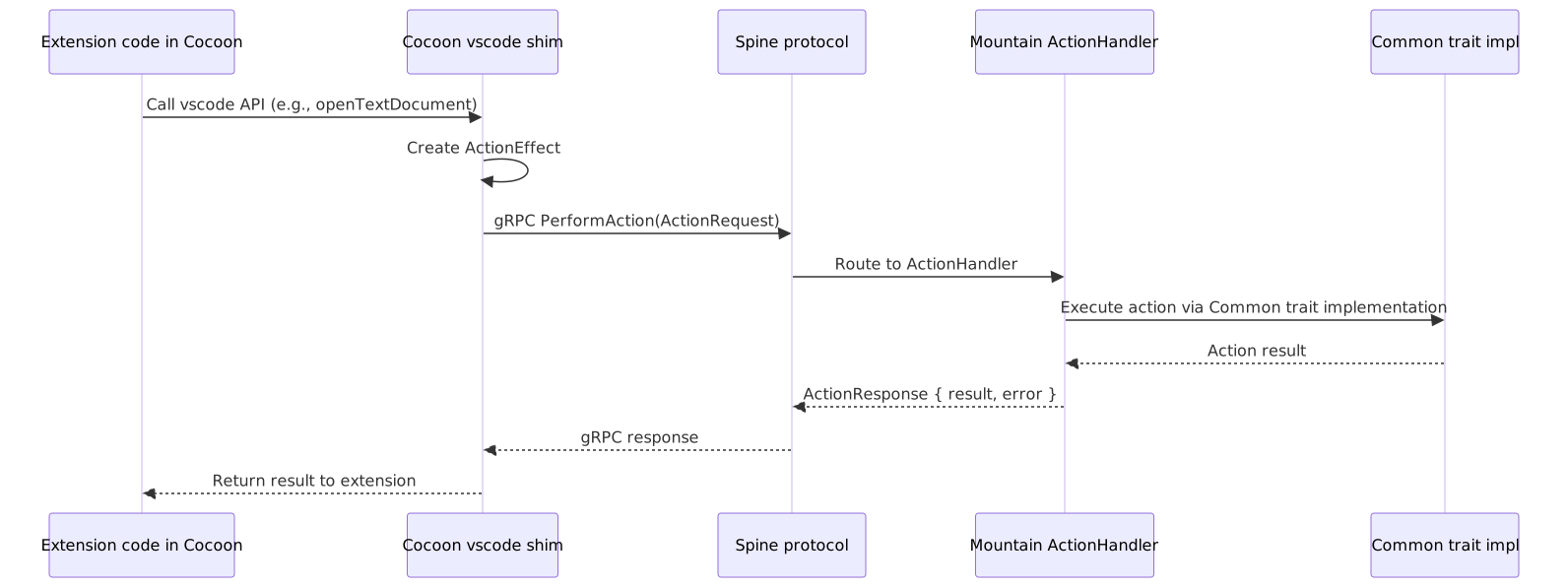
ActionEffect Types
The Spine protocol encodes all possible extension actions as a discriminated union:
ActionEffect
    +-- ReadFile { path }
    +-- WriteFile { path, content }
    +-- DeleteFile { path }
    +-- ReadDirectory { path }
    +-- CreateDirectory { path }
    +-- Stat { path }
    +-- Rename { from, to }
    +-- Copy { from, to }
    +-- WatchFile { path }
    +-- OpenDialog { options }
    +-- SaveDialog { options }
    +-- ShowMessage { message, options }
    +-- ShowInputBox { options }
    +-- OpenExternal { url }
    +-- ExecuteProcess { command, args }
    +-- ExecuteCommand { command_id, args }
    +-- RegisterCommand { command_id, handler }
    +-- CreateTerminal { options }
    +-- WriteTerminal { id, data }
    +-- ReadClipboard { format }
    +-- WriteClipboard { text }
    +-- GetConfiguration { key }
    +-- SetConfiguration { key, value, target }
    +-- GetSecret { key }
    +-- SetSecret { key, value }
    +-- DeleteSecret { key }
    +-- CreateWebviewPanel { options }
    +-- SendWebviewMessage { id, message }
    // ... 80+ effect variants
Routing
The Cocoon tier router (Cocoon/Source/Services/Handler/VscodeAPI/ROUTING.md) decides per-call whether to:
- Track A (Stock Node): Handle entirely in-process via unmodified
extHost*.tscode - Track B (Rust Native): Package as
ActionEffect, send viaSpinegRPCtoMountain, await native execution - Track C (Cocoon Bespoke): Hand-rolled
TypeScriptimplementation inCocoon(last resort)
Connection Lifecycle 🔄
Mountain-Cocoon Connection
Bootstrap order (critical): Cocoon’s gRPC server (port 50052) must bind before Cocoon attempts to connect to Mountain’s gRPC server (port 50051). The bootstrap stage order is: RPCServer (Stage 5) bind -> MountainConnection (Stage 3) connect. Mountain allows a 30-second connection budget; reversing this order causes Mountain to time out before Cocoon is ready to accept the handshake.
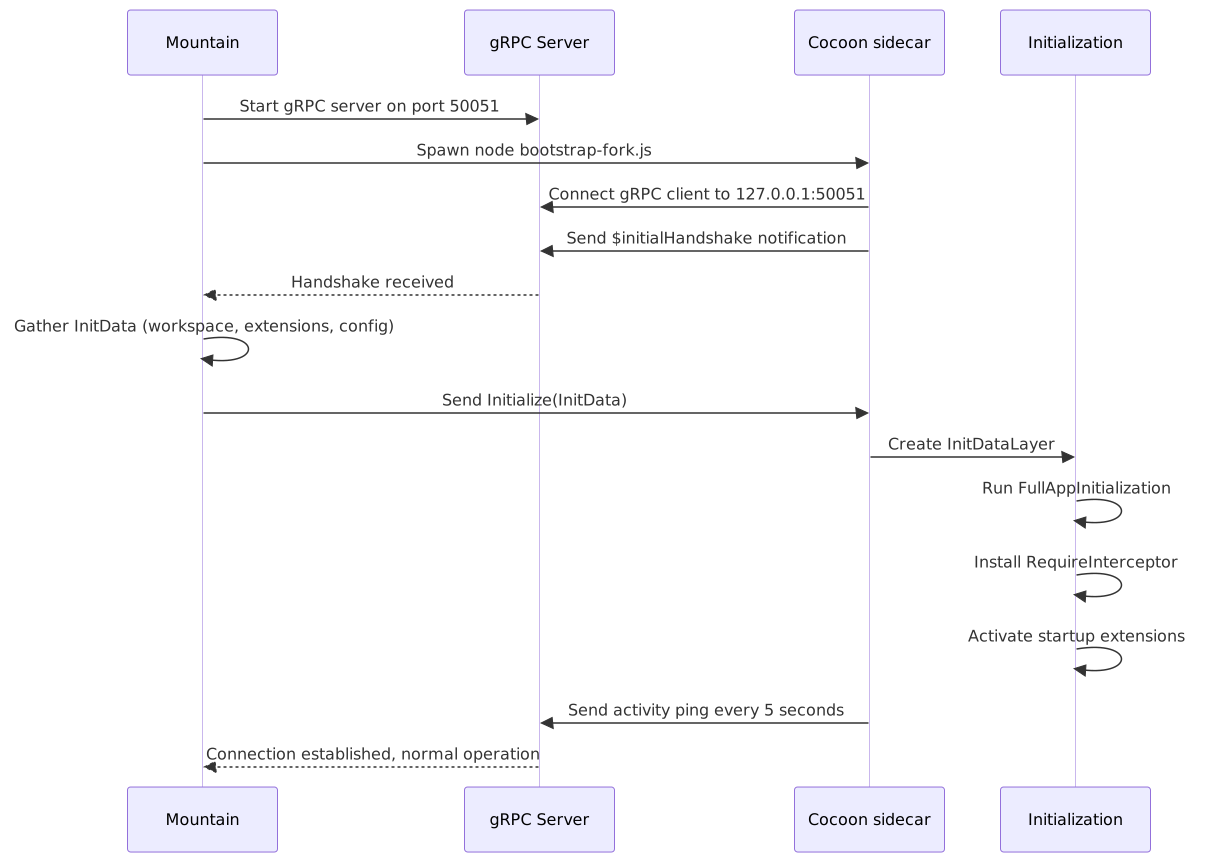
Disconnection and Reconnection
Network failure or Cocoon crash
    |
    v
Mountain detects stale connection (no activity within 30-second check window)
    |
    +---> Option 1: Restart Cocoon (default, up to 3 attempts)
    |       - Kill existing Cocoon process
    |       - Re-spawn from bootstrap-fork.js
    |       - Re-run initialization sequence
    |       - Restored state: configuration, open files
    |       - Lost state: extension-managed data, webview panels
    |
    +---> Option 2: Graceful degradation
            - Show reconnection notification in UI
            - Queue extension API calls
            - Reconnect when Cocoon restarts (user manually)
Mountain-Air Connection
Mountain starts
    |
    v
Mountain spawns Air binary
    |
    v
Air connects gRPC to 127.0.0.1:50053
    |
    +---> Sends Connect { services: [updater, indexer, crypto] }
    |
    v
Mountain registers Air services in AppState
    |
    v
Normal operation:
    - Mountain dispatches background work via PerformAction
    - Air responds with action results
    - Both sides maintain activity tracking
    - Staleness check every 30 seconds
Health Monitoring 💓
Heartbeat Protocol
Both gRPC connections (Mountain-Cocoon, Mountain-Air) implement a health monitoring protocol. Health is tracked via a per-connection ConnectionMetadata struct in Vine/Source/Client/Shared.rs:
| Parameter | Value |
|---|---|
| Staleness check interval | 30 seconds (HEALTH_CHECK_INTERVAL_MS) |
| Max retry attempts | 10 (MAX_RETRY_ATTEMPTS) |
| Retry base delay | 200 ms (RETRY_BASE_DELAY_MS) |
| Connection timeout | 30 seconds (CONNECTION_TIMEOUT) |
Health is determined by three conditions in Vine/Source/Client/CheckSideCarHealth.rs: the connection must be marked IsHealthy, the LastActivity timestamp must not be older than HEALTH_CHECK_INTERVAL_MS (30 seconds), and the FailureCount must not exceed MAX_RETRY_ATTEMPTS (10). Failed connections are recorded via RecordSideCarFailure which increments the counter and sets IsHealthy to false; successful activity resets both via UpdateSideCarActivity.
Diagnostic Logging
All connection state changes are logged via the dev_log! system at Mountain/Source/IPC/DevLog/:
[DEV:Vine] gRPC server listening on [::1]:50051
[DEV:Vine] Cocoon connected, handshake received
[DEV:Vine] Heartbeat OK (seq=142, latency=3ms)
[DEV:Vine] Heartbeat TIMEOUT (last: seq=147, 18s ago)
[DEV:Vine] Cocoon disconnected, restarting (attempt 1/3)
Protocol Buffer Definitions 📁
Current Location
Protocol definitions currently reside in consuming components:
| File | Location | Purpose |
|---|---|---|
Vine.proto | Element/Vine/Proto/Vine.proto | Core Mountain<->Cocoon gRPC services |
Grove.proto | Element/Grove/Proto/Grove.proto | Grove-specific WASM hosting extensions |
| Server impl | Element/Mountain/Source/Vine/ | Rust gRPC server (tonic, consumes Vine stubs) |
| Client impl | Element/Cocoon/Source/Services/Mountain/gRPC/Client.ts | TypeScript gRPC client |
| RouteManifest | Element/Cocoon/Source/Generated/RouteManifest.ts | Auto-generated routing tier enumeration |
Code Generation
Rust types are generated from .proto files using prost and tonic-build at compile time:
// Mountain/build.rs  (references Vine element's proto)
fn main() {
    tonic_build::configure()
        .compile(&["../Vine/Proto/Vine.proto"], &["../Vine/Proto"])
        .expect("Failed to compile protos");
}
TypeScript types are generated using protoc-gen-ts and checked into the Cocoon source tree as generated artifacts.
Security 🛡️
All gRPC connections are restricted to localhost only ([::1] / 127.0.0.1). No remote connections are accepted.
| Aspect | Implementation |
|---|---|
| Transport | TCP loopback only |
| Auth | None required (localhost-only) |
| Encryption | None (localhost-only, no network exposure) |
| Port binding | [::1] only, not 0.0.0.0 |
| DNS isolation | All non-localhost traffic blocked by Mist |
| Timeout | 30-second staleness check |
| Backpressure | gRPC flow control + bounded channels |
Related Documentation 📋
- Architecture - System architecture
- BuildPipeline - Build pipeline
- EditorCore - Editor workbench
- Polyfills - Compatibility shims
- RustInfrastructure -
Rustbackend components - Building - Build instructions
- Workflow/ApplicationStartupAndHandshake
- Workflow/CreatingAndInteractingWithAWebviewPanel
Project Maintainers: Source Open (Source/[email protected]) | GitHub Repository | Report an Issue