
Reference
Build Pipeline
The complete build pipeline for the Land code editor, from environment variable resolution through binary artifact production - six stages across Rust, TypeScript, and static asset compilation.
Build Pipeline 📋
The complete build pipeline for the Land code editor, from environment variable resolution through binary artifact production. The pipeline is a multi-stage, multi-language process that coordinates Rust, TypeScript, and static asset compilation across 15+ component workspaces.
Table of Contents
- Pipeline Overview
- Environment Variable System
- Program Launch Options
- Profile System
- Env Propagation to Each Element
- Rust Build Process
- TypeScript Build Process
- Artifact Layout
- Output Transform Pipeline
- Worker Build Process
- SideCar Binary Management
- Related Documentation
Pipeline Overview 📋
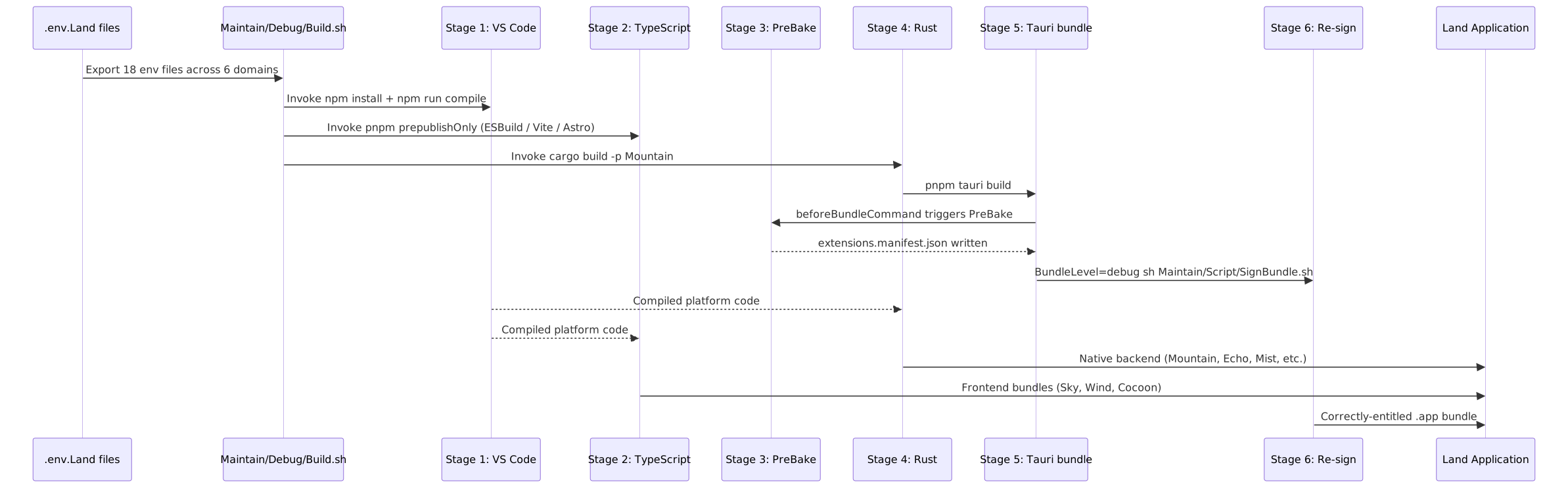
The Land build has six stages:
- VS Code platform compile - produces the compiled JavaScript platform code
- TypeScript build -
pnpm prepublishOnlyfor Wind, Cocoon, Output, Sky, Worker - PreBake - walks extension roots, writes
extensions.manifest.json(runs viabeforeBundleCommand) - Rust build -
cargo build -p Mountain - Tauri bundle -
pnpm tauri build - Re-sign -
Maintain/Script/SignBundle.shstrips quarantine bits and re-applies entitlements
 ### Stage 1: VS Code Platform Compilation
The VS Code source is vendored as a Git submodule at Dependency/Microsoft/Dependency/Editor. Stage 1 produces the compiled JavaScript platform code that Cocoon and Sky consume:
Important
This step is a mandatory prerequisite for every Land build. Cocoon and Output both depend on the compiled output. You must be on Node 24 (tracked in Dependency/Microsoft/Dependency/Editor/.nvmrc).
cd Dependency/Microsoft/Dependency/Editor

# Switch to Node 24 (reads .nvmrc automatically)
nvm use 24

git fetch --all
git reset --hard Parent/main
git clean -dfx
pnpm install
pnpm run compile
pnpm run compile-extensions-build
The compile-extensions-build step produces out-<platform> directories containing compiled extension JavaScript and metadata. These are consumed by the Output element for bundling into the @codeeditorland/output package.
Stage 2: Land Application Assembly
Stage 2 compiles the native Rust backend and bundles the TypeScript frontend into a runnable Tauri application:
cd Land
export Trace=all Record=1 Disable=false
./Maintain/Debug/Build.sh --profile debug-electron-bundled
The build script invokes, in sequence:
- TypeScript build (
pnpm prepublishOnly) - Output, Cocoon, Worker, Wind, Sky- Output artifact bundling via
ESBuildfor the VS Code platform code - Cocoon compilation via
ESBuildfor the extension host - Worker compilation via
ESBuildfor the service worker - Wind + Sky compilation via
Vite/Astrofor the UI layer
- Output artifact bundling via
- PreBake (
Maintain/Build/Manifest/PreBake.ts) - runs viabeforeBundleCommandinsidetauri.conf.json; walks extension roots and writesextensions.manifest.json. Fires in all build paths (directpnpm tauri build,Build.sh, CI) - not only via the wrapper script. Consumed byLoadFromCache.rsat boot (<50 ms vs ~1200 ms live scan). - Rust workspace compilation via
cargo build -p Mountain - Tauri bundling for the final
.appbundle - Re-sign (
Maintain/Script/SignBundle.sh) - strips macOS quarantine bits withxattr -cr, then re-signs withcodesign --force --deep --sign -plusEntitlements.plist(hardened runtime + JIT + file-picker TCC). Invoked automatically byBuild.sh:BundleLevel=debug sh Maintain/Script/SignBundle.sh
Environment Variable System ⚙️
Land uses a multi-file .env system with 18 files across 6 domains:
File Discovery
The build script resolves env files in this priority order:
$Land_Env_File(if explicitly exported).env.Land(local gitignored overrides)../.env.Land(one level up).env.Land.Sample(checked-in defaults)../.env.Land.Sample
The resolved file is sourced via set -a; . "$EnvFile"; set +a, exporting every key-value pair into the shell environment so every child tool inherits the same variable set.
File Hierarchy by Domain
| Domain | Suffix | Dev File | Sample File | Production File |
|---|---|---|---|---|
| Core | (none) | .env.Land | .env.Land.Sample | .env.Land.Production |
| Node | .Node | .env.Land.Node | .env.Land.Node.Sample | .env.Land.Production.Node |
| Extensions | .Extensions | .env.Land.Extensions | .env.Land.Extensions.Sample | .env.Land.Production.Extensions |
| PostHog | .PostHog | .env.Land.PostHog | .env.Land.PostHog.Sample | .env.Land.Production.PostHog |
| Diagnostics | .Diagnostics | .env.Land.Diagnostics | .env.Land.Diagnostics.Sample | .env.Land.Production.Diagnostics |
| Bundled | .Bundled | .env.Land.Bundled | .env.Land.Bundled.Sample | .env.Land.Production.Bundled |
Profile-to-File Mapping
Each build profile loads a specific combination of env files:
| Profile | Files Loaded | Purpose |
|---|---|---|
| Development | .env.Land | Default local development |
| Development + Bundled | .env.Land + .env.Land.Bundled | Dev with pre-compiled workbench |
| Development + Extensions | .env.Land + .env.Land.Extensions | Dev with extension installation |
| Development + Node | .env.Land + .env.Land.Node | Dev with specific Node version |
| Development + PostHog | .env.Land + .env.Land.PostHog | Dev with telemetry enabled |
| Development + Diagnostics | .env.Land + .env.Land.Diagnostics | Dev with debug tracing |
| Production | .env.Land.Production | Release build |
| Production + Bundled | .env.Land.Production + .env.Land.Production.Bundled | Release with bundled workbench |
| Production + Extensions | .env.Land.Production + .env.Land.Production.Extensions | Production with extension skip |
| Production + Node | .env.Land.Production + .env.Land.Production.Node | Production with specific Node |
| Production + PostHog | .env.Land.Production + .env.Land.Production.PostHog | Production with telemetry |
| Production + Diagnostics | .env.Land.Production + .env.Land.Production.Diagnostics | Production with trace/record |
Profile System 📋
Available Build Profiles
| Profile String | Workbench | Feature Coverage | Output Type |
|---|---|---|---|
debug | Browser | 70-80% | Dev binary |
debug-mountain | Mountain | 80-90% | Dev binary (recommended) |
debug-electron | Electron | 95%+ | Dev binary |
debug-electron-rest | Electron + OXC | 95%+ + fastest TS | Dev binary |
debug-electron-minimal | Electron | No built-in extensions | Dev binary |
debug-mountain-only | Mountain | No Cocoon subprocess | Dev binary |
debug-cocoon-headless | None | Mountain + Cocoon, Wind disabled | Dev binary |
debug-kernel | None | Pure Mountain, no built-ins | Dev binary |
debug-electron-compiled | Electron | Single-binary embedded resources | Dev binary |
debug-mountain-compiled | Mountain | Single-binary embedded resources | Dev binary |
debug-electron-bundled | Electron | Vite/Astro compiled workbench | Dev binary |
debug-browser-bundled | Browser | Vite/Astro compiled workbench | Dev binary |
debug-sessions-bundled | Sessions | Vite/Astro compiled workbench | Dev binary |
debug-workbench-bundled | Workbench | Vite/Astro compiled workbench | Dev binary |
debug-bundled-all | All four | Single Rollup pass | Dev binary |
production-electron-bundled | Electron | Optimized release | Prod binary |
production-electron-unbundled | Electron | Release without bundled assets | Prod binary |
Program Launch Options
The build script supports additional runtime flags:
| Flag | Effect |
|---|---|
--run | Launch application immediately after build |
--profile <name> | Select build profile (default: debug) |
--help | Show profile documentation |
Env Propagation to Each Element 📡
Each Element reads the resolved environment variables through its own build system path:
 ### Rust Elements (Mountain, Common, Echo, Mist, Rest, SideCar, Air, Grove, Vine)
Maintain/Debug/Build.sh
|
| exports every Tier* and Product* env var
v
Cargo / build.rs
|
+---> PropagateTierGating() emits:
| cargo:rustc-env=Tier<Capability>=<Value> (compile-time env var)
| cargo:rustc-cfg=feature="Tier<Capability><Value>" (cfg gates)
| cargo:rerun-if-changed=<envfile> (invalidation)
|
v
Mountain/src/main.rs
|
+---> env!("TierFileSystem") // compile-time constant
+---> #[cfg(feature = "TierFileSystemLayer4")] // conditional compilationTypeScript Elements (Cocoon)
Maintain/Debug/Build.sh
    |
    | serialises every Tier* var into CocoonEsbuildDefine JSON blob
    v
Cocoon/Source/Configuration/ESBuild/Config/TargetConfig.ts
    |
    | merges blob into esbuild define map
    v
ESBuild bundle
    |
    | __LandTier_FileSystem__ is substituted at bundle time
    v
Cocoon/Source/Bootstrap/Implementation/CocoonMain.ts
    |
    | populates globalThis.__LandTiers from substituted identifiers
    | falls through to process.env.Tier<Capability>
    | falls through to hard-coded defaults
    v
Cocoon/Source/Utility/Tier.ts
    |
    | exposes const Tier = { ... } as const
    | read by all Cocoon services
TypeScript Elements (Sky/Wind)
Maintain/Debug/Build.sh
    |
    | exports Tier* and Product* env vars
    v
Sky/astro.config.ts
    |
    | forwards every Tier* env var to Vite define map
    v
Vite bundle
    |
    | import.meta.env.TierFileSystem is substituted at build time
    v
Wind/Source/Utility/Tier.ts
    |
    | reads import.meta.env.Tier<Capability>
    | falls through to globalThis.__LandTiers
    | falls through to hard-coded defaults
    | emits console.info() boot banner
Cross-Element Agreement
All three runtime banners must report identical tier values:
| Element | Banner Mechanism |
|---|---|
Mountain | Rust env!() banner |
Cocoon | LandFixLog.Info banner |
Wind | console.info banner |
A mismatch indicates one build tool read a different env file.
Rust Build Process 🔧
Workspace Structure
The Rust elements form a workspace at Land/Cargo.toml:
[workspace]
members = [
	"Element/Common",
	"Element/Echo",
	"Element/Mist",
	"Element/Mountain",
	"Element/Rest",
	"Element/SideCar",
	"Element/Air",
	"Element/Grove",
	"Element/Vine",
]
build.rs Tier Propagation
Every Rust Element with tier-gated features has a build.rs that:
- Calls
PropagateTierGating()which scans the resolved env file - Emits
cargo:rustc-env=for every row (defaults + overrides) - For non-default values, emits
cargo:rustc-cfg=feature="Tier<Capability><Value>" - Calls
IsDeclaredTierFeature()to validate againstCargo.toml [features] - Calls
IsDefaultTierValue()to identify no-op default values - Emits
cargo:warning=for any unrecognized(Key, Value)pair
Feature Gates
Non-default tier values activate Cargo features:
[features]
default = []
TierFileSystemLayer4 = []
TierGlobNative = []
When .env.Land contains TierFileSystem=Layer4, the build script passes --features TierFileSystemLayer4 to cargo. Default values do not activate features, keeping the baseline compilation lean.
TypeScript Build Process 📦
ESBuild Compilation (Cocoon, Output, Worker)
Cocoon, Output, and Worker compile through ESBuild with:
- Env-injected defines via
CocoonEsbuildDefineJSON blob - Target configuration via
TargetConfig.ts(resolves platform, arch, profile) - Output to
Element/<Name>/Target/orElement/<Name>/Compiled/
Vite/Astro Compilation (Sky, Wind)
Sky and Wind compile through Vite with Astro:
- Vite define map receives every
Tier*env var asimport.meta.env.Tier* - Astro pages are rendered to static HTML + JS bundles
- SkyBridge (~2900 lines) is compiled as the runtime event bridge
- Output to
Element/Sky/Target/
Artifact Layout 📁
After a successful build, artifacts are placed in per-Element target directories:
 Notable artifacts:
| Path | Description |
|---|---|
Element/Mountain/Target/<level>/Mountain | Native binary |
Element/Mountain/Target/<level>/bundle/macos/*.app | Signed .app bundle |
Element/Mountain/Target/<level>/extensions.manifest.json | Pre-baked extension list (~50 ms load vs 1200 ms live scan) |
Element/Sky/Target/Static/Application/ | VS Code workbench assets |
Element/Sky/Target/Static/Bundled/Electron/ | Vite-bundled workbench (bundled profiles only) |
Element/Cocoon/Compiled/cocoon-bootstrap.js | Extension host bundle |
Output Transform Pipeline 🔧
The Output element manages the compilation of VS Code platform source code through two parallel compiler paths:
Primary Path (ESBuild)
- Input:
Dependency/Editor/out/(Stage 1 compiled VS Code) - Processing:
ESBuildapplies transforms forTauricompatibility:- Module resolution remapping (
electron->@tauri-apps/api) require()interceptor patches- Source map generation
- Polyfill injection (see Polyfills)
- Module resolution remapping (
- Output:
Output/Target/@codeeditorland/output/
Optional Path (Rest/OXC)
- Input: Same VS Code source
- Processing:
Rest(RustOXC) re-compilesTypeScript2-3x faster:OXCparser handles decorators, class fields,JSXOXCtransformer produces VS Code-compatible outputRest--compilerCLI flag activates this path
- Output: Same layout, substituted for
ESBuildoutput when--compiler restis set
Worker Build Process 🗂️
The Worker element compiles independently through ESBuild with no runtime dependencies:
- Input:
Element/Worker/Source/ - ESBuild produces:
- Service worker script (caching strategy, offline handler)
- CSS module interceptor (intercepts
import 'styles.css'in JS and loads as<link>)
- Output:
Element/Worker/Target/ - Consumed by:
Skyat build time (bundled into UI as<script type="module">)
The Worker has zero runtime dependencies ("dependencies": {} in its package.json). All functionality is implemented with standard ServiceWorker and Cache APIs.
SideCar Binary Management 📦
The SideCar element manages vendored Node.js runtime binaries:
- Binary resolution:
Build.shreadsNodeVersionandNodePlatformfrom env - Download:
SideCar’s tool fetches the exact binary from official sources - Caching: Binaries cached by version + platform key in
SideCar/Cache.json - Git LFS: Large binaries stored via
Git LFSfor version-controlled distribution - Consumption:
Mountain’s build process copies the resolved binary into the app bundle
Target triples supported:
aarch64-apple-darwin(Apple SiliconmacOS)x86_64-apple-darwin(IntelmacOS)aarch64-unknown-linux-gnu(ARM64 Linux)x86_64-unknown-linux-gnu(x86_64 Linux)aarch64-pc-windows-msvc(ARM64 Windows)x86_64-pc-windows-msvc(x86_64 Windows)
Related Documentation 📋
- Architecture - System architecture overview
- EditorCore - Editor workbench adaptation
- Polyfills - Compatibility shims
- RustInfrastructure -
Rustbackend components - InterComponentProtocol -
gRPCprotocol specification - Building - Build instructions and prerequisites
- BuildMatrix - Full build variant matrix
- EnvironmentVariables - Complete env var reference
- Workflow/TierGatedImplementationSelection
Project Maintainers: Source Open (Source/[email protected]) | GitHub Repository | Report an Issue
See Also
- 🟠 Low-Level Shim - Engine-level prototype hooks
- 🔵 Coverage / Telemetry - Application-level service routing