
Elements
Cocoon
The Node.js extension host sidecar for Land. Runs VS Code extensions unmodified in a supervised Node.js process, constructs a per-extension vscode API shim via Effect-TS layers, and communicates with Mountain over the Vine gRPC protocol for native operations.
Cocoon is the Node.js extension host sidecar for Land. We run VS Code extensions in a supervised Node.js process and provide a vscode API shim via Effect-TS. That shim translates extension API calls into declarative Effects. Effects are either handled in-process or dispatched to Mountain via gRPC for native execution.
Overview 📋
Cocoon is a TypeScript application built with Effect-TS.
- We replicate the VS Code Extension Host API.
- We communicate with
MountainviagRPC(Vineprotocol) on port 50052. - We are spawned and supervised by
Mountain’sProcessManagementmodule.
| Attribute | Value |
|---|---|
| Language | TypeScript (Effect-TS v3.21) |
| Runtime | Node.js (managed by SideCar) |
| IPC | gRPC (Vine protocol) |
| Dependencies | effect, @effect/platform, @effect/platform-node, @grpc/grpc-js, @codeeditorland/output, google-protobuf |
| Managed by | Mountain ProcessManagement/CocoonManagement.rs |
Architecture 🏗️
Module Map 🗺️
| Path | Purpose |
|---|---|
Source/Bootstrap/Implementation/CocoonMain.ts | Entry point; initialization prelude |
Source/PatchProcess/ | Process hardening, signal handling, log piping |
Source/Core/ExtensionHost.ts | Extension activation and lifecycle |
Source/Core/RequireInterceptor.ts | Require() patching for VS Code module loading |
Source/Core/ApiFactory.ts | Constructs vscode.* API objects per extension |
Source/Services/Commands.ts | Command registration and execution |
Source/Services/Window.ts | Window and editor management |
Source/Services/Workspace.ts | Workspace and file system operations |
Source/Services/Configuration.ts | Configuration read/write |
Source/Services/gRPC/Client.ts | gRPC client for Mountain communication |
Source/ModuleInterceptor/ | ESM and CommonJS module interception |
Source/TypeConverter/ | Type conversion between extensions and gRPC |
Source/Telemetry/ | PostHog + OTLP telemetry |
Source/IPC/ | Internal message channel system |
Source/WebviewPanel/ | Webview panel lifecycle management |
Source/Generated/ | Proto-generated TypeScript types |
Workbench Architecture Role 🏗️
In the broader Land workbench, Cocoon replaces the VS Code Electron main process’s extension host responsibilities. The architecture comparison across the three layers:
| Aspect | VS Code (Electron) | Land Equivalent |
|---|---|---|
| Main process | Electron Main | Mountain (Rust) |
| Renderer process | Electron Renderer | Wind (Tauri WebView) |
| IPC mechanism | Electron ipcRenderer/ipcMain | Tauri invoke/event + gRPC (Vine) |
| Preload | electron preload.js | Wind Preload.ts |
| Extension host | Child Node process | Cocoon (Node sidecar via gRPC) |
| File system | Node.js fs module | Mountain native Rust fs (Track B) |
| Native dialogs | Electron dialog API | Mountain via Tauri dialog plugin |
| Window management | Electron BrowserWindow | Tauri Window |
Service Composition Patterns 🧩
Cocoon’s internal services follow the same Effect-TS Layer composition patterns used throughout Wind and Mountain.
Layer Stack Architecture
Each service in Cocoon is composed through Effect-TS Layers. The broader Wind layer stack defines three workbench variants that determine which services are wired to Cocoon versus resolved locally:

Layer Composition
Individual services use Layer.succeed to wrap a concrete implementation, matching the pattern used in Cocoon’s own internal providers:
// Individual service pattern (shared across Wind and Cocoon):
export const LiveEditorServiceLayer = Layer.succeed(
	EditorTag,
	makeEditorService(),
);

// Tauri layer - Layer.mergeAll: flat composition
export const TauriLiveLayer = Layer.mergeAll(
	SandboxLive,
	ConfigurationWithSyncLive,
	EditorLive,
	FilesLive,
	TerminalLive,
	// ... all ~37 service layers
);Effect-TS’s compile-time dependency tracking ensures that no service can be used without its dependencies being satisfied by the Layer stack. A missing dependency produces a TypeScript type error.
ManagedRuntime
Cocoon and Wind both rely on Effect-TS’s ManagedRuntime to bridge the Effect system with imperative call sites (such as VS Code extension API entry points):
// From Wind/Source/Effect/LandWorkbench/LandWorkbenchRuntime.ts

// Initialized eagerly via IIFE at module load time, stored on
// globalThis.__CEL_WIND_RUNTIME__ so multiple Sky chunks that import
// this module share a single runtime instance.
export const LandWorkbenchRuntime: ManagedRuntime<...> = ...;

// Service lookups are sub-5ms after initialization.
// LandWorkbenchRuntime.Dispose() tears down the runtime and clears
// the global slot (used on window unload).
Cocoon mirrors this pattern to ensure that extension API calls (e.g., vscode.commands.registerCommand) resolve through the Effect system without runtime overhead.
Workbench Variants 🚀
Cocoon participates in several workbench variants that select the extension host and IPC backend at build time:
| Variant | Cocoon Role | Build Profile (shorthand) |
|---|---|---|
| Browser | No Cocoon (70-80% API coverage via stock Node) | debug |
| Mountain | Full Cocoon via gRPC (80-90%) | debug-mountain |
| Electron | Full Cocoon, Electron IPC backend (95%+) | debug-electron |
| Cocoon Headless | Cocoon subprocess only, no Wind/Workbench UI | debug-cocoon-headless |
| Mountain Only | No Cocoon (core services, no extension host) | debug-mountain-only |
| Kernel | No Cocoon, no Wind, no built-ins | debug-kernel |
Variant Selection
Sky’s index.astro entry point selects the active variant at build time via environment variables:
const Bundle = process.env["Bundle"] === "true";
const Mountain = process.env["Mountain"] === "true";
const Electron = process.env["Electron"] === "true";
const BrowserProxy = process.env["BrowserProxy"] === "true";

const WorkbenchType =
	Electron || Mountain
		? "Electron"
		: BrowserProxy
			? "BrowserProxy"
			: "Browser";
When Mountain or Electron is selected, Cocoon is spawned as the extension host process. In Browser mode, Cocoon is omitted and the workbench runs with a simulated extension host. Unused variants are tree-shaken by Vite.
Command Dispatch Architecture 🎮
Cocoon is the extension command execution layer in Land’s three-layer command system:
Command Registration:
    Wind (UI commands)      -- editor actions, palette commands
    Mountain (native)       -- Tauri command handlers, file ops, window mgmt
    Cocoon (extensions)     -- vscode.commands.registerCommand from extensions
Command Execution Flow
Commands flow through all three layers depending on origin:
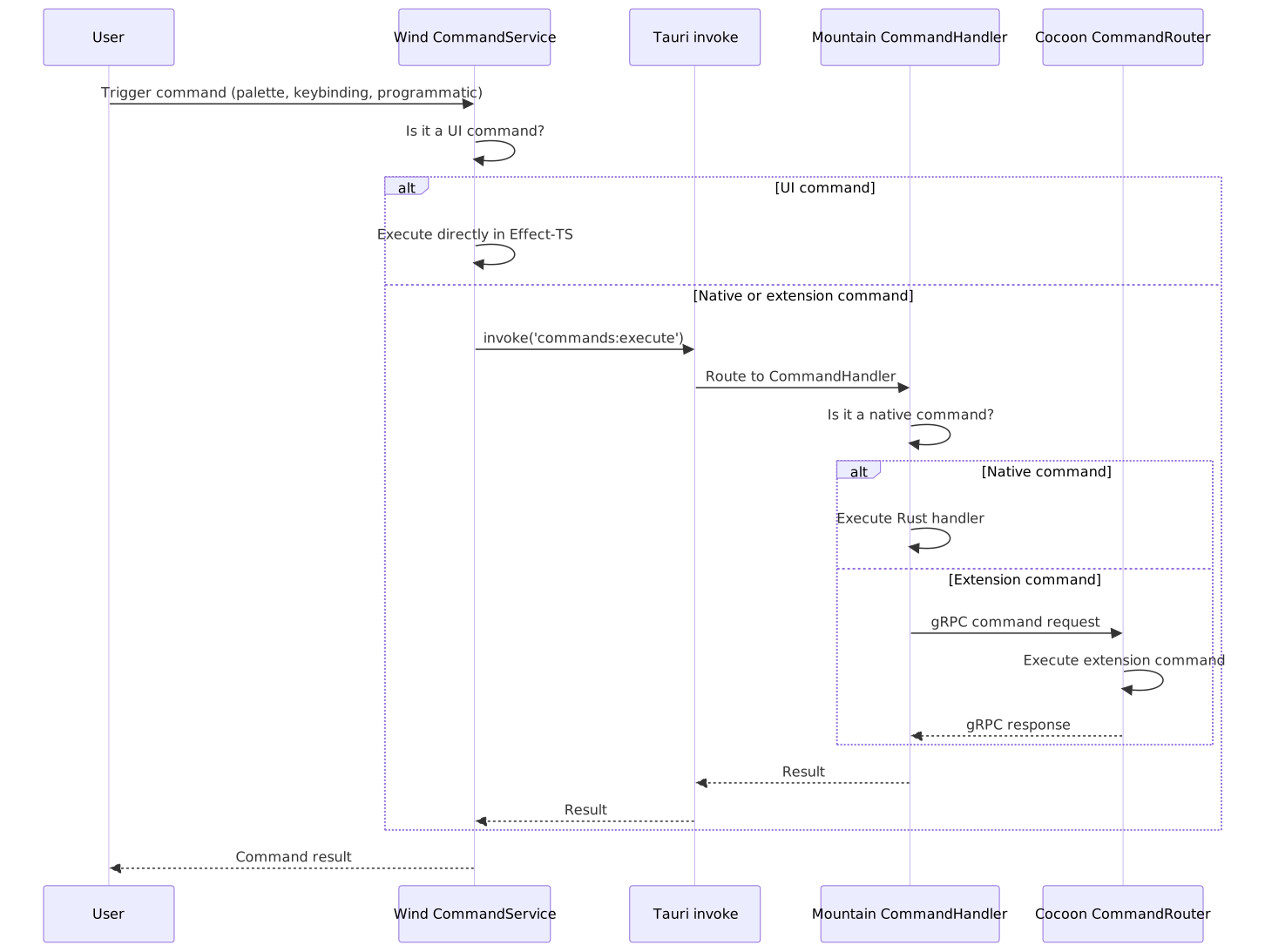
Command Categories
| Category | Registered In | Examples |
|---|---|---|
| Native editor | Wind | cursorMove, type, replacePreviousChar |
| Window/UI | Mountain | workbench.action.toggleSidebar, workbench.action.terminal.toggleTerminal |
| File operations | Mountain | workbench.action.files.save, workbench.action.files.openFile |
| Extension | Cocoon | editor.action.formatDocument, git.commit |
TierIPC Routing 🌐
Cocoon is reachable from the Wind layer through TierIPC, a routing system that decides which IPC backend handles each channel. The TierIPC env var (loaded from .env.Land via turbo.json globalEnv) selects the routing mode at runtime, with per-subsystem overrides.
Routing Modes
| Value | Behaviour |
|---|---|
Mountain | Default. All channel.call() invocations route to Mountain via Tauri MountainIPCInvoke. |
NodeDeferred | Mountain first; if Mountain returns undefined or has no handler, falls through to Cocoon gRPC. |
Node | All calls bypass Mountain and go directly to Cocoon via the cocoon:request gRPC bridge. |
Per-Subsystem Tier Variables
Cocoon handles extension-facing channels that default to Mountain but can be routed directly:
| Variable | Default | Channels governed | Cocoon Interaction |
|---|---|---|---|
TierTerminal | Mountain | terminal, localPty | Cocoon’s terminal forwarder (if enabled) |
TierSCM | Mountain | git (localGit) | Extension Git integration calls |
TierDebug | Mountain | extensionHostStarter, extensionhostdebugservice | Debugger extension API calls |
TierLanguageFeatures | Mountain | language, languages | Language feature providers |
TierSearch | Mountain | search | Search provider via extension |
TierTasks | Node | tasks | Task execution (typically Cocoon-routed) |
TierAuth | Node | auth | Authentication providers |
TierStorage | Mountain | storage | Extension storage APIs |
TierModel | Mountain | model, textFile, file | Document model operations |
TierEncryption | Mountain | encryption | Encryption provider calls |
TierWebSocket | Disabled | Mist WebSocket transport (Phase 6, not yet active) | Future WebSocket extension transport |
Editor Service Architecture ✏️
The editor service in Wind integrates the VS Code CodeEditor widget (based on Monaco) with Mountain’s native capabilities and Cocoon’s extension providers.
Text Model Flow
User opens file
    |
    v
Wind EditorService
    |
    +---> TextModelService resolves URI
    +---> IFileService.readFile() via Tauri -> Mountain
    +---> Content returned as Uint8Array
    +---> TextModel created with content
    +---> Language mode detected from file extension
    +---> Editor widget instantiated with TextModel
    |
    v
Editor renders in Sky UI
Extension Provider Integration
Language features (hover, completion, definition) requested through Cocoon’s extension host flow back to the Wind editor service:
Extension registers HoverProvider (vscode.languages.registerHoverProvider)
    |
    v
Cocoon LanguagesProvider stores provider reference
    |
    v
User hovers over symbol in editor
    |
    v
Wind EditorService detects hover intent
    |
    v
Wind -> Tauri -> Mountain -> Cocoon (via gRPC: languages:provideHover)
    |
    v
Cocoon resolves HoverProvider.ProvideHover() in extension context
    |
    v
Result flows back: Cocoon -> Mountain -> Tauri -> Wind -> Monaco editor
    |
    v
Hover tooltip rendered in Sky UI
VS Code API Coverage Strategy 🔬
Cocoon is the primary vehicle for VS Code API coverage in Land. The strategy uses a dual-track routing system.
Track A: Stock Node (Maximum Compatibility)
Cocoon loads unmodified VS Code extHost*.ts source files from @codeeditorland/output. The ExtHostContext/MainContext RPC glue that normally runs in Electron’s main process is shimmed by Cocoon to work over gRPC.
Coverage: All APIs that the stock implementation handles in-process are immediately compatible.
Track B: Rust Native (Performance)
For I/O-heavy APIs, the Cocoon vscode shim routes operations through gRPC to Mountain for native Rust execution. This provides:
- Faster filesystem operations (native syscalls vs Node.js fs)
- Direct OS integration (clipboard, dialogs, keychain)
- Native terminal PTY (
portable-ptycrate vsnode-pty) - Zero-copy buffer handling
Dual-Track Routing
| Track | Implementation | Latency | When Used |
|---|---|---|---|
| A - Stock Node | Unmodified VS Code extHost*.ts | In-process | Default for all APIs |
| B - Rust Native | gRPC ActionEffect to Mountain | ~1ms | I/O-heavy APIs (fs, terminal, search, git) |
Track Distribution by API
| API | Default Track | Rationale |
|---|---|---|
commands.registerCommand | A | In-process bookkeeping |
commands.executeCommand | A | In-process dispatch |
window.showInformationMessage | A | In-process dialog |
workspace.openTextDocument | A | Content in memory |
workspace.fs.readFile | B | Native file I/O (faster) |
workspace.findFiles | B | Native search (ripgrep) |
window.createWebviewPanel | B | Mountain owns webview lifecycle |
env.clipboard | B | Native clipboard access |
Coverage Matrix
The authoritative coverage matrix is at Documentation/GitHub/VSCode-API-Coverage-Matrix.md. Status symbols:
| Status | Meaning |
|---|---|
| Working | Activation + feature render path confirmed end-to-end |
| Partial | RPC wired but UI render gap, or missing sub-method |
| Stubbed | Registration accepted but no effect |
| Not attempted | No implementation started |
| Lifted | Pure-function stateless implementation already landed |
Startup Sequence 🚀
1. Node.js process starts (bootstrap-fork.js)
2. PatchProcess/index.ts pipes logs, handles SIGTERM/SIGINT,
   monitors parent process
3. IpcProvider starts gRPC client, connects to Mountain on
   port 50052, sends $initialHandshake, waits for init request
4. globalThis.__LandTiers populated from esbuild identifiers,
   environment variables, or hard-coded defaults
5. RequireInterceptor patches require() for VS Code bundle
   loading, maps electron-less requires to Tauri equivalents
6. Mountain sends Initialize gRPC request with InitData
   (workspace, manifests, configuration snapshot)
7. InitDataLayer created from payload
8. FullAppInitialization Effect resolves ExtensionHostProvider
   and activates startup extensions
VS Code API Shim 📦
We construct VS Code API objects for each extension via ApiFactory.ts.
API Namespace Providers 📋
| Namespace | Provider | Track |
|---|---|---|
vscode.commands | CommandsProvider | A + S (Stock + Sky-direct) |
vscode.window | WindowProvider | A (Stock Node) |
vscode.workspace | WorkspaceProvider | A + B (Stock + Rust-native) |
vscode.languages | LanguagesProvider | A (Stock Node) |
vscode.env | EnvironmentProvider | A (Stock Node) |
vscode.extensions | ExtensionsProvider | A (Stock Node) |
vscode.workspace.fs | FileSystemProvider | B (Rust-native via gRPC) |
vscode.tasks | TasksProvider | A (Stock Node) |
vscode.debug | DebugProvider | A + B |
vscode.tests | TestsProvider | A (Stock Node) |
vscode.Notebook* | NotebookProvider | A (Stock Node) |
vscode.WebviewPanel | WebviewProvider | B (Mountain-backed) |
Service Providers 🔌
Each service is an Effect-TS Layer:
| Service | Module | Key Methods |
|---|---|---|
| CommandsProvider | Services/Commands.ts | registerCommand, executeCommand, getCommands |
| WindowProvider | Services/Window.ts | createWebviewPanel, showTextDocument, activeTextEditor, showInformationMessage |
| WorkspaceProvider | Services/Workspace.ts | workspaceFolders, openTextDocument, findFiles, applyEdit, getConfiguration |
| LanguagesProvider | Services/Language/ | registerHoverProvider, registerCompletionProvider, registerDefinitionProvider |
| ConfigurationProvider | Services/Configuration.ts | get, has, inspect, update, onDidChange |
| WebviewProvider | Services/WebviewPanel/ | createWebviewPanel, postMessage, onDidReceiveMessage |
| FileSystemProvider | Services/File/ | readFile, writeFile, stat, readDirectory, createDirectory, delete, rename |
gRPC Communication 🌐
We communicate with Mountain via the Vine gRPC protocol.
| Feature | Implementation |
|---|---|
| Connection | Unary gRPC calls + bidirectional streaming |
| Heartbeat | 5-second interval via Heartbeat RPC |
| Reconnection | Automatic on disconnect (exponential backoff) |
| Timeout | 30-second request timeout |
| Backpressure | gRPC flow control |
RequireInterceptor 🪝
The RequireInterceptor patches Node.js’s require() to enable VS Code module loading.
Interception Rules 📋
| Module Pattern | Replacement | Behavior |
|---|---|---|
electron | (empty stub) | No-op module with expected method stubs |
original-fs | fs | Redirect to Node.js standard library |
keytar | Custom stub | OS keychain via Mountain gRPC |
spdlog | Custom stub | No-op logging |
vscode-windows-registry | Custom stub | No-op (macOS-only) |
./extHost*.js | Load from @codeeditorland/output | VS Code stock source |
./mainThread*.js | Load from @codeeditorland/output | VS Code stock source |
vscode | ApiFactory construct | Extension-specific API surface |
Extension Lifecycle 🔄
1. Mountain scans extension directories, sends manifests in InitData
2. RequireInterceptor loads extension's main module, calls activate()
3. Extension registers commands, providers via vscode.* API calls
4. API calls dispatch through providers -- in-process (Track A)
   or via gRPC to Mountain (Track B)
5. Mountain sends DeactivateExtension request, subscriptions
   disposed, module unloaded
Dual-Track Routing 🛤️
| Track | Implementation | Latency | When Used |
|---|---|---|---|
| A - Stock Node | Unmodified VS Code extHost*.ts | In-process | Default for all APIs |
| B - Rust Native | gRPC ActionEffect to Mountain | ~1ms | I/O-heavy APIs (fs, terminal, search, git) |
Track Distribution by API 📊
| API | Default Track | Rationale |
|---|---|---|
commands.registerCommand | A | In-process bookkeeping |
commands.executeCommand | A | In-process dispatch |
window.showInformationMessage | A | In-process dialog |
workspace.openTextDocument | A | Content in memory |
workspace.fs.readFile | B | Native file I/O (faster) |
workspace.findFiles | B | Native search (ripgrep) |
window.createWebviewPanel | B | Mountain owns webview lifecycle |
env.clipboard | B | Native clipboard access |
Related Documentation 📖
- Mountain -
gRPCserver andProcessManagement - Wind - Frontend service layer (parallel API surface)
- Sky - Web frontend and workbench variants
- Output - Compiled platform code consumer
- Vine -
gRPCprotocol definitions - Polyfills - Initialization prelude
- EditorCore - VS Code API coverage strategy
- VSCode-API-Coverage-Matrix - Comprehensive API status
Funding 💎
Project Maintainers: Source Open (Source/[email protected]) | GitHub Repository | Report an Issue
See Also
- 🟠 Low-Level Shim - Engine-level prototype hooks
- 🔵 Coverage / Telemetry - Application-level service routing