
Deep Dive
Wind - Deep Dive
TauriLiveLayer construction, full TierIPC routing table with per-subsystem overrides, Layer.succeed service composition, eager ManagedRuntime singleton, Preload.ts global shimming, Generated Upstream import depth, the Wind Codegen pipeline, core architecture principles, service implementation patterns, and security architecture.
Wind is the Effect-TS frontend service layer for Land. the internal mechanics of TauriLiveLayer construction, TauriMainProcessService tier routing, Preload.ts shimming strategy, the Generated/*Upstream.ts codegen pipeline, and how Wind maintains lockstep state with Output’s service copy. For an overview, see the Wind element page.
Core Architecture Principles
| Principle | Description | Key Components Involved |
|---|---|---|
| High-Fidelity Emulation | Provide comprehensive VSCode renderer environment emulation to maximize Sky’s reusability with minimal changes to VSCode UI components. | Preload.ts, Platform/VSCode/* |
| Effect-TS Native Architecture | Build the entire application with Effect-TS, using Layer composition and declarative effects for maximum robustness and type safety. | All Effect-based modules |
| Anti-Corruption Layer | Create a clean abstraction layer over Tauri APIs, isolating platform specifics and simplifying usage within the application. | Integration/Tauri/Wrap/*, Preload.ts |
| Declarative Service Composition | Implement VSCode frontend services using Effect-TS patterns for clean dependency injection and composable service construction. | Application/*, AppLayer |
| Performance Optimization | Utilize efficient bundling strategies and optimized API shimming to minimize overhead while maintaining compatibility. | Configuration/ESBuild/*, Preload.ts |
| Security Hardening | Implement comprehensive security measures for Tauri webview environment, including CSP and secure API boundaries. | Preload.ts security patterns |
TauriLiveLayer Construction and Service Dependency Graph
TauriLiveLayer is assembled in Source/Effect/Layers/Tauri.ts using Layer.mergeAll(). Effect-TS resolves dependencies at layer construction time, so all required Tags must have a provider in the merged set. The construction order follows the dependency graph below:
Sandbox (no deps)
  └── IPC (requires Sandbox)
        └── Mountain (requires IPC)
              ├── MountainSync (requires Mountain)
              ├── Configuration (requires Mountain)
              ├── Files (requires Mountain + Configuration)
              │     └── WorkingCopy (requires Files)
              │           └── TextFile (requires Files + WorkingCopy)
              ├── Terminal (requires Mountain)
              ├── Storage (requires Mountain)
              └── Extensions (requires Mountain + Storage)

Environment (no deps)
Telemetry (requires IPC)
Health (requires Mountain + IPC)
Bootstrap (requires all core services)

Editor (requires Mountain + Configuration)
Model (requires Editor)
TextModelResolver (requires Model)
Decorations (requires Editor)

ActivityBar, Sidebar, StatusBar, Panel (require Mountain)
Notification, Progress, QuickInput (require Mountain)
Commands (requires Mountain)
Clipboard (requires Mountain)
Search (requires Mountain)
Language, Themes, Keybinding (require Mountain + Configuration)
Vine (requires Mountain)
Layer.mergeAll() takes the flat list of Layer values and Effect-TS automatically threads the required Tags through the dependency graph. If a Tag is missing from the merged set, the build fails at compile time with a typed error naming the unsatisfied requirement. There are no runtime “service not found” failures.
Individual services use Layer.succeed to wrap a concrete implementation object. Layer.effect is not used in Wind. Services are constructed eagerly so there is no lazy Effect execution on the critical startup path:
export const LiveEditorServiceLayer = Layer.succeed(
	EditorTag,
	makeEditorService(),
);
ManagedRuntime Singleton
Wind/Source/Effect/LandWorkbench/LandWorkbenchRuntime.ts provides a module-singleton ManagedRuntime that wraps the full LandWorkbenchLayer:
- Initialized eagerly via an IIFE at module load time. The initialization cost is paid once during Sky bundle evaluation, not deferred to the first service call.
- Stored on
globalThis.__CEL_WIND_RUNTIME__so multiple Sky chunks that import this module share a single runtime instance. LandWorkbenchRuntime.Get()returns the pre-warmed runtime. Service lookups are sub-5 ms after initialization.LandWorkbenchRuntime.Dispose()tears down the runtime and clears the global slot, called on window unload.
Deep Dive into Wind’s Components
1. Preload.ts (The Environmental Foundation)
- Role: This cornerstone script is executed in the Tauri webview before
Sky’s main application code loads, establishing a VSCode-like renderer environment. - Advanced Implementation:
- Global API Reconstruction: Creates and populates the
window.vscodeglobal object that serves as the critical entry point for workbench services. - Sophisticated API Shimming:
ipcRenderer: Implements the completeIpcRendererinterface by mapping calls to Tauri’s event system (TauriEmit,TauriListen) andTauriInvokemechanism.process: Provides anISandboxNodeProcess-like object with comprehensive properties includingplatform,arch,env, andcwd().
- Configuration Resolution: Implements
context.resolveConfiguration()which dynamically readsISandboxConfigurationfrom meta tags injected byMountain. - Security Hardening: Implements Content Security Policy (CSP) compliance and secure API boundary enforcement.
- Global API Reconstruction: Creates and populates the
2. Integration/Tauri/* (The Anti-Corruption Layer)
- Role: Provides the direct interface to Tauri APIs with comprehensive type conversions, all robustly wrapped within
Effects. - Concrete Architecture:
- Effect Factories (
Wrap/*): Contains concrete Effect wrappers for all Tauri APIs, converting promise-based APIs to Effect-based operations. - Type Converters (
Convert/*): Provides pure functions for converting between VSCode types and Tauri-compatible formats. - Complex Resolvers (
Resolve/*): Implements multi-step operations with comprehensive error handling and fallback logic. - Domain-Specific Errors (
Error/*): Defines precise error classes enabling sophisticated error handling withEffect.catchTag.
- Effect Factories (
3. Effect/Produce/* (Effect Meta-Factories)
- Role: Provides powerful “meta-factories” for creating
Effects from existing promise-based functions in a standardized, type-safe manner. - Concrete Patterns:
FromAsync: Higher-order function that transforms async functions into Effect-producing functions with proper error typing.OptionalFromAsync: Variant for functions that returnnullorundefined, correctly wrapping results inOption<T>.- Generic Type Inference: Concrete type inference patterns that preserve function signatures while adding Effect semantics.
4. Application/* (Core Frontend Services)
- Role: Houses high-fidelity, Effect-TS native implementations of VSCode’s core frontend services.
- Concrete Service Architecture:
- Tag-Based Dependency Injection: Uses
Context.Tagpatterns for clean service dependency management. - Orchestration Patterns: Complex multi-step Effects that define the core business logic of each service.
- Layer Composition: Concrete layer composition patterns that build complete service implementations from individual components.
- Error Transformation: Comprehensive error transformation from integration-level errors to application-level error types.
- Tag-Based Dependency Injection: Uses
Concrete Technical Architecture
VSCode Environment Emulation Architecture
Wind’s concrete environment emulation enables seamless VSCode compatibility:
 Wind's environment emulation provides high-fidelity VSCode API compatibility through:
- Interface Matching: All VSCode API interfaces are precisely matched in TypeScript definitions
- Behavior Preservation: API behavior is preserved through sophisticated shimming and event mapping
- Error Handling Compatibility: Error types and handling patterns match VSCode expectations
- Asynchronous Semantics: Async operations maintain proper sequencing and error propagation
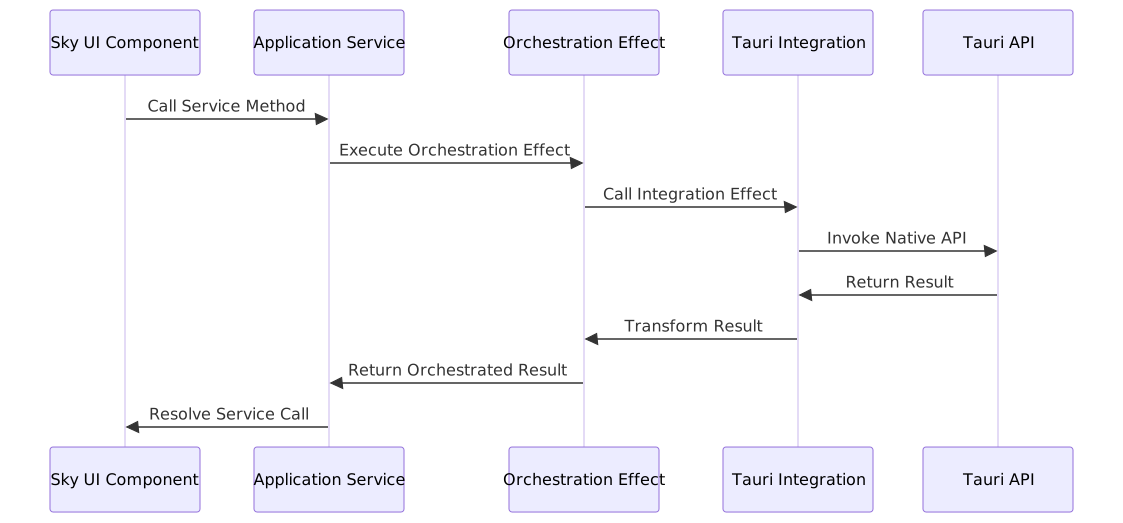
Effect-TS Service Layer Architecture
Wind implements concrete Effect-TS patterns for robust service composition:
 ### Security Architecture
Wind implements comprehensive security measures for the Tauri webview environment:
 Wind's security architecture prevents common webview security vulnerabilities through:
- CSP Enforcement: Strict Content Security Policy prevents script injection
- API Boundary Security: Secure communication channel between webview and native code
- Input Validation: Comprehensive input validation at all API boundaries
- Error Containment: Errors are properly contained and logged without information leakage
Performance Analysis: API Call Latency
Latency Breakdown:
- VSCode API Shim: ~0.02ms (interface matching overhead)
- Effect Orchestration: ~0.05ms (Effect composition overhead)
- Tauri Integration: ~0.03ms (API boundary crossing)
- Native Execution: Variable (OS-dependent native operation)
- Total Latency: ~0.10ms + native execution time
Benefits:
- Type Safety: Full TypeScript type checking throughout the call stack
- Error Handling: Comprehensive error handling with proper typing
- Testability: Mockable Effects for comprehensive unit testing
- Maintainability: Clear separation of concerns between layers
TauriMainProcessService Routing
Source/Service/TauriMainProcessService.ts implements the VS Code IMainProcessService interface. Every workbench IPC call arrives here as a { channel, args } pair and is dispatched based on the TierIPC environment variable and per-subsystem overrides.
Global TierIPC Values
| TierIPC value | Behavior |
|---|---|
Mountain (default) | All channel.call() invocations route to Mountain via Tauri MountainIPCInvoke |
NodeDeferred | Mountain first; if Mountain returns undefined or has no handler, falls through to Cocoon via gRPC |
Node | All calls bypass Mountain and route to Cocoon via the cocoon:request gRPC bridge |
Mountain Tier (default)
All calls invoke @tauri-apps/api’s invoke() directly:
invoke("MountainIPCInvoke", { method: channel, args });Mountain’s WindServiceHandlers/mod.rs receives the call, pattern-matches on channel, and dispatches to the appropriate atomic handler file.
NodeDeferred Tier
Mountain is tried first. If Mountain returns undefined or throws a “command not found” error, the call is forwarded to Cocoon via the cocoon:request Tauri event bridge:
const result = await invoke("MountainIPCInvoke", { method: channel, args });
if (result === undefined) {
	return emit("cocoon:request", { channel, args });
}
return result;
This tier allows gradual migration: Mountain handlers that are not yet implemented fall through to Cocoon’s Node.js implementations without any call-site changes.
Node Tier
All calls bypass Mountain entirely and go directly to Cocoon:
emit("cocoon:request", { channel, args });Used when developing Cocoon-side handlers in isolation before the Mountain counterpart is ready.
Per-Subsystem Tier Overrides
Individual subsystems can override TierIPC independently. All default to Mountain unless noted:
| Variable | Default | Channels governed |
|---|---|---|
TierTerminal | Mountain | terminal, localPty |
TierSCM | Mountain | git (localGit) |
TierDebug | Mountain | extensionHostStarter, extensionhostdebugservice |
TierLanguageFeatures | Mountain | language, languages |
TierSearch | Mountain | search |
TierOutputChannel | Mountain | output |
TierNativeHost | Mountain | nativeHost |
TierTreeView | Mountain | tree |
TierStorage | Mountain | storage |
TierModel | Mountain | model, textFile, file |
TierTasks | Node | tasks |
TierAuth | Node | auth |
TierEncryption | Mountain | encryption |
TierWebSocket | Disabled | Mist WebSocket transport (not yet active) |
All tier variables are read from .env.Land and mirrored into import.meta.env.Tier* at build time by astro.config.ts. Wind/Source/Utility/Tier.ts and Cocoon/Source/Utility/Tier.ts resolve the same values without a runtime lookup.
Output Lockstep Copy
Output/Source/Service/Tauri/Main/Process/Service.ts is an exact copy of Wind’s TauriMainProcessService.ts. Output is loaded by Cocoon’s bootstrap in a module context that cannot import from Wind’s npm package, so the file is duplicated. Any routing change applied to Wind must be applied to Output in the same commit. The lockstep requirement is enforced by code review convention, not a build check.
Preload.ts Global Shimming Strategy
Source/Preload.ts executes synchronously in the Tauri webview before any module from @codeeditorland/output is parsed. It patches the globals that VS Code’s workbench bundle accesses at module evaluation time.
What Gets Patched and Why
| Global | Patched value | Why required |
|---|---|---|
window.vscode.ipcRenderer | Object with send, invoke, on, once backed by Tauri invoke/listen | VS Code workbench calls ipcRenderer.invoke("vscode:mainProcessService", ...) at bootstrap |
window.vscode.ipcRenderer.invoke | async (channel, args) => invoke("MountainIPCInvoke", ...) | Routes workbench IPC to Mountain |
window.process | ISandboxNodeProcess-shaped object with platform, arch, env, cwd() | Multiple VS Code modules read process.platform at module load time |
window.MonacoEnvironment | { getWorkerUrl(moduleId, label) } | Monaco editor resolves web worker URLs through this global before spawning workers |
window.__CEL_LAND__.polyfills | Object with requestIdleCallback, queryLocalFonts, __name | WKWebView does not implement these browser APIs that the workbench bundle expects |
window.ISandboxConfiguration | Parsed from meta tags injected by Mountain | VS Code’s NativeWorkbenchEnvironmentService reads this at startup to locate extensions, logs, and user data |
Timing Guarantee
The Astro Layout.astro for each workbench variant loads Preload as an inline <script> tag with is:inline before the workbench bundle <script> tag. This guarantees synchronous execution order because browsers execute inline scripts before deferred module scripts. The Preload script dispatches land-preload-ready as a CustomEvent on window so any async code that needs to wait for the shims can do so without polling.
Generated *Upstream.ts Files
The Source/Effect/Generated/ directory contains approximately 492 auto-generated files, one per VS Code workbench service. Each file exports a bridge shape object that Wind’s service implementations use to route calls to the correct Mountain IPC channel.
Warning
These files are generated output. Never edit them directly. To change a generated bridge shape, update the corresponding template in Source/Codegen/Emit/EmitServiceSchema.ts and re-run the codegen step.
Import Depth Convention
The correct import depth from Generated/SomeService/SomeUpstream.ts to Codegen/Base.ts is three levels up:
// Correct
import { CodegenBase } from "../../../Codegen/Base";
If you see module resolution errors mentioning Codegen/Base or Codegen/Type after a Wind rebuild, the generator template in EmitServiceSchema.ts has regressed. Fix the template, not the generated files.
Wind Codegen Pipeline
Source/Codegen/ extracts VS Code service bridge shapes from the compiled VS Code source tree. The pipeline runs as part of pnpm prepublishOnly and writes results to Source/Effect/Generated/.
Steps
Walk - The codegen walker reads
Dependency/Microsoft/VSCode/(the compiled VS Code source) and locates allcreateDecorator<IServiceName>()calls. Each decorator call defines one service identifier.Extract - For each service identifier, the extractor finds the corresponding TypeScript interface definition and enumerates its method signatures: parameter names, types, and return types.
Emit -
EmitServiceSchema.tswrites one*Upstream.tsfile per service toSource/Effect/Generated/. Each file exports aServiceUpstreamobject mapping method names to their IPC channel strings.Validate - The generated files are compiled as part of
pnpm prepublishOnly. Any type mismatch between the generated bridge shape and Wind’s service implementation surfaces as a compile error.
When to Re-Run
Re-run codegen after updating the VS Code dependency version in Output. New service methods added in VS Code will otherwise be missing from Wind’s bridge shapes, causing those calls to silently route to the wrong Mountain handler.
Effect-TS Service Pattern
Every Wind service follows the Define/Implement/Problem structure:
// Effect/Clipboard/Define.ts - service Tag
export class Clipboard extends Context.Tag("Clipboard")<
	Clipboard,
	{ readonly readText: Effect.Effect<string, ClipboardProblem> }
>() {}

// Effect/Clipboard/Implement.ts - Tauri-backed Layer using Layer.succeed
export const ClipboardLive = Layer.succeed(
	Clipboard,
	Clipboard.of({
		readText: Effect.tryPromise({
			try: () => invoke("get_clipboard", { format: "text" }),
			catch: (e) => new ClipboardProblem({ message: String(e) }),
		}),
	}),
);

// Effect/Clipboard/Problem.ts - typed errors
export class ClipboardProblem extends Data.TaggedError("ClipboardProblem")<{
	message: string;
}> {}
Callers depend on the Clipboard Tag, not on the concrete implementation. Swapping ClipboardLive for MockClipboardLayer in TestLayer requires no changes to consuming code.
Custom Service Implementation
Wind enables sophisticated custom service implementations:
// Advanced service implementation pattern
import { Context, Effect, Layer } from "effect";

import { DialogServiceTag } from "./Application/Dialog/Tag";

// Custom service implementation
class CustomDialogService {
	async showCustomDialog(
		options: CustomDialogOptions,
	): Promise<URI[] | undefined> {
		return Effect.runPromise(
			Effect.flatMap(DialogServiceTag, (dialogService) =>
				Effect.tryPromise(() =>
					dialogService.showCustomDialog(options),
				),
			),
		);
	}
}

// Service layer composition - use Layer.succeed for sync init
const CustomDialogLayer = Layer.succeed(
	DialogServiceTag,
	new CustomDialogService(),
);
Performance Monitoring Integration
Wind supports comprehensive performance monitoring:
// Performance monitoring integration
import { Effect, Metric } from "effect";

const apiCallTimer = Metric.timer("wind_api_call_duration");

async function monitoredApiCall() {
	return Effect.runPromise(
		apiCallTimer(
			Effect.flatMap(DialogServiceTag, (service) =>
				Effect.tryPromise(() => service.showOpenDialog(options)),
			),
		),
	);
}
Advanced Error Handling Patterns
Sophisticated error handling with Effect-TS:
// Comprehensive error handling pattern
import { Effect, Either } from "effect";

import { DialogProblem } from "./Application/Dialog/Error";

async function robustDialogOperation() {
	const result = await Effect.runPromise(
		Effect.either(
			Effect.flatMap(DialogServiceTag, (service) =>
				Effect.tryPromise({
					try: () => service.showOpenDialog(options),
					catch: (error) => new DialogProblem({ cause: error }),
				}),
			),
		),
	);

	return Either.match(result, {
		onLeft: (error) => handleError(error),
		onRight: (uris) => handleSuccess(uris),
	});
}
Ecosystem Integration Mapping
 ### Service Implementation Table
| VSCode Service | Wind Service | Effect-TS Layer | Communication Protocol |
|---|---|---|---|
vscode.window | WindowService | Effect.Service | Tauri Events |
vscode.commands | CommandService | Effect.Service | Tauri Events |
vscode.workspace | WorkspaceService | Effect.Service | Tauri Events |
vscode.extensions | ExtensionService | Effect.Service | Tauri Events |
vscode.languages | LanguageService | Effect.Service | Tauri Events |
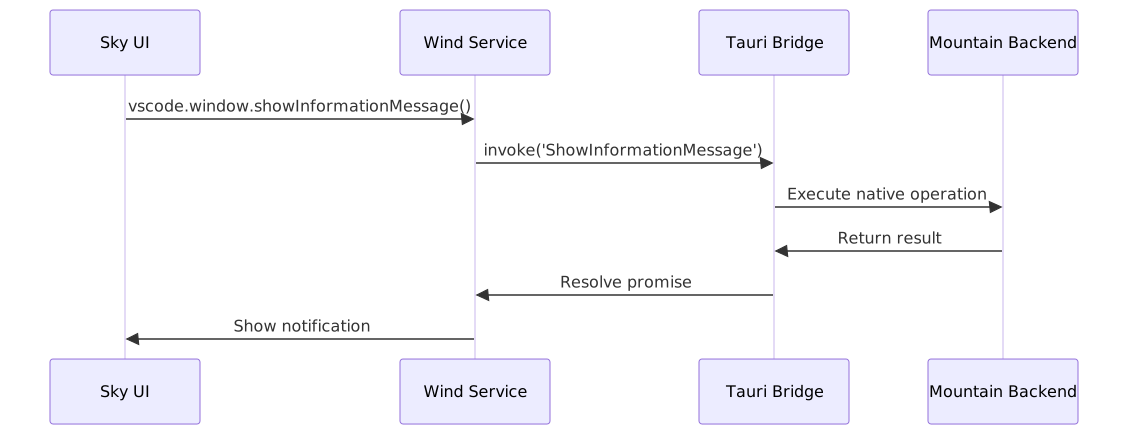
Component Block Map
 ### Service Communication Patterns
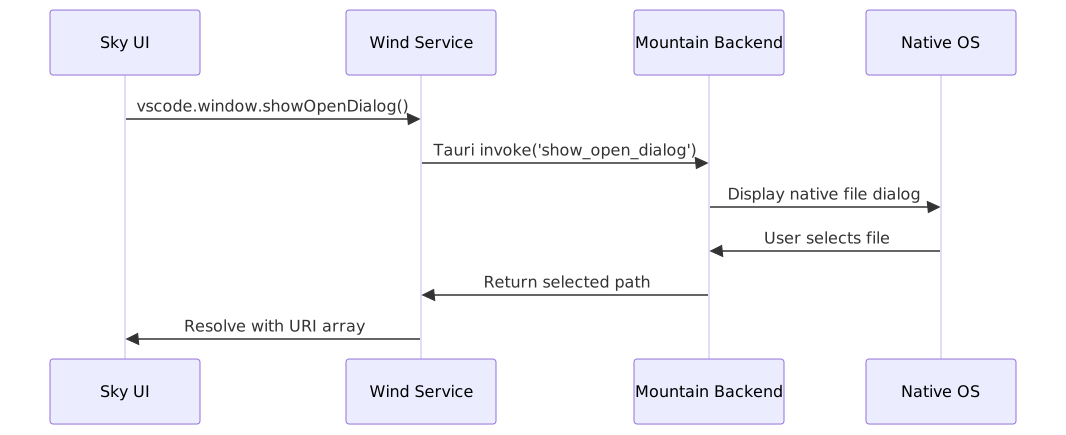
  ## Advanced Integration Patterns
Real-time UI Operation Flow
 ## Performance Characteristics
Bundle Optimization
- Tree Shaking: Advanced tree shaking eliminates unused code from final bundles
- Code Splitting: Strategic code splitting for optimal loading performance
- Minification: Comprehensive minification for minimal bundle size
- Compression: Gzip/Brotli compression support
Runtime Performance
- Fast API Resolution: Efficient service resolution through Effect-TS layers
- Minimal Overhead: Optimized shimming with near-native performance
- Memory Efficiency: Efficient memory usage through smart caching
- Startup Optimization: Fast startup through optimized initialization
Security Performance
- Low Security Overhead: Security measures designed for minimal performance impact
- Efficient Validation: Fast input validation with comprehensive coverage
- Secure Communication: Optimized secure communication channels
- Audit Performance: Efficient security auditing without performance degradation
Advanced Security Considerations
Webview Security
Wind implements comprehensive webview security measures:
 ### API Security Patterns
Sophisticated API security patterns:
// Secure API pattern implementation
import { Effect } from "effect";

class SecureAPIService {
	async secureOperation(input: unknown): Promise<Result> {
		return Effect.runPromise(
			Effect.flatMap(ValidationServiceTag, (validator) =>
				Effect.flatMap(validator.validateInput(input), (validated) =>
					Effect.tryPromise(() =>
						this.executeSecureOperation(validated),
					),
				),
			),
		);
	}
}
Development Guidelines
Adding New Services
When adding new services to Wind, follow these patterns:
- Define Service Interface: Create TypeScript interface matching VSCode service
- Implement Effect-TS Service: Create Effect-TS based implementation
- Create Integration Layer: Implement Tauri integration with proper error handling
- Define Service Tag: Create Context.Tag for dependency injection
- Compose Service Layer: Add service to main AppLayer composition
Performance Optimization
- Minimize Bundle Size: Carefully manage dependencies and imports
- Optimize Effect Composition: Use efficient Effect composition patterns
- Implement Caching: Strategic caching for frequently used operations
- Monitor Performance: Continuous performance monitoring and optimization
Security Best Practices
- Validate All Inputs: Comprehensive input validation at all boundaries
- Implement Proper Error Handling: Secure error handling without information leakage
- Follow Tauri Security Guidelines: Adhere to Tauri security recommendations
- Regular Security Audits: Continuous security auditing and improvement
Wind represents a sophisticated integration layer that enables VSCode-based UI components to operate seamlessly within the Tauri framework, providing high performance, robust security, and comprehensive compatibility through advanced TypeScript and Effect-TS patterns.