
Reference
Polyfills and Compatibility Shims
Every polyfill, shim, and compatibility layer that enables the VS Code workbench and extension host to function inside Land's Tauri WebView and Node.js sidecar architecture.
Polyfills and Compatibility Shims
This document catalogues every polyfill, shim, and compatibility layer that enables the VS Code workbench and extension host to function inside Land’s Tauri WebView and Node.js sidecar architecture. These layers translate Electron and Node.js APIs into their Tauri and Rust equivalents without modifying upstream VS Code source code.
Table of Contents
- Wind Preload Shim
- SkyBridge
- Cocoon Initialization Prelude
- Output Transform Pipeline
- Worker Service Worker
- LandFix Diagnostics
- Telemetry Bridge
- Polyfill Lifecycle
- Global Namespace Cleanup
Wind Preload Shim 🛡️
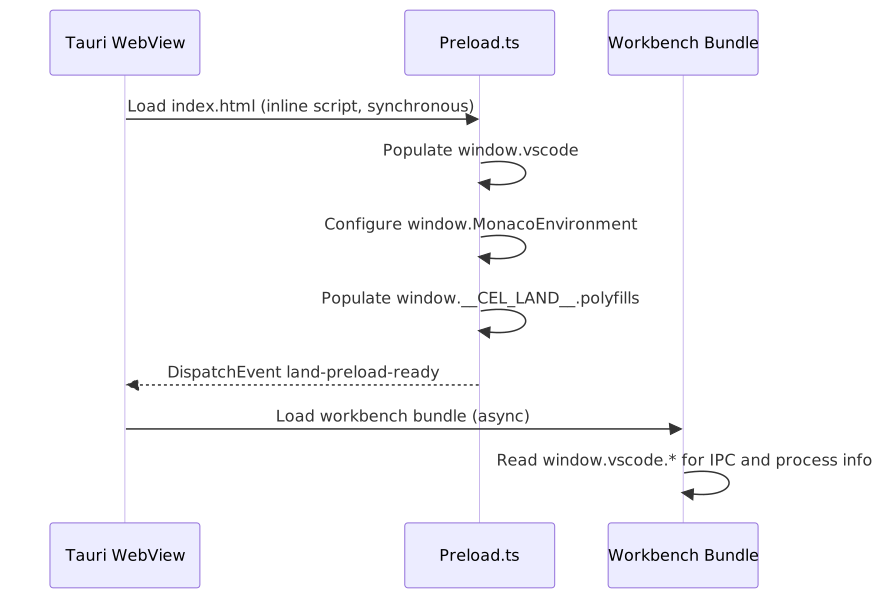
The Preload shim (Wind/Source/Preload.ts) establishes the VS Code workbench execution environment inside the Tauri WebView. It runs as the first script loaded by index.html and patches the global scope with Electron/Node.js APIs before the workbench bundle loads.
Execution Order
 ### Shimming Strategy
The Preload shim defines the following global replacements:
| VS Code Expectation | Land Implementation | Mechanism |
|---|---|---|
window.vscode.ipcRenderer | Tauri invoke() wrapper | Custom IPCRenderer interface in Wind/Source/Types/Interface/IPCRenderer.ts |
process.env | Object with tier-gated env vars | Populated from __LandTiers at preload time |
process.platform | darwin / linux / win32 | Derived from navigator.userAgent at preload time |
process.versions | Object with node, http_parser, v8 | Populated from navigator.userAgent |
process.argv | Array of launch arguments | Received from Tauri IPC |
process.cwd() | Resolved workspace root | Set during init from Mountain |
process.nextTick() | Custom microtask queue | Standard queueMicrotask + polyfill |
globalThis.__filename | Environment path appRoot | Path to workbench bundle root |
webFrame (Electron) | No-op stub | Methods return undefined |
Diagnostic Tag
Preload.ts emits a preload-shim diagnostic entry:
[preload-shim] window.vscode.ipcRenderer installed
[preload-shim] process shim installed
[preload-shim] land-preload-ready dispatched
This diagnostic is visible in Mountain’s dev-log when Trace=preload-shim is set. It confirms the shim is active in the real WebView (not an Astro SSR pass where window is a Node polyfill).
SkyBridge 🌐
SkyBridge (Sky/Source/Function/Sky/Bridge.ts) is the runtime event routing bridge between Tauri’s IPC system and the VS Code workbench’s internal message channel system. It is composed of focused sub-modules in the Bridge/ directory:
InstallCommands.ts-sky://command/*handlers (execute, register, unregister)InstallDebug.ts- debug breakpoint gutter sync (sky://debug/addBreakpoints)InstallDeadChannelListeners.ts- no-op stubs for deprecated channelsInstallDiagnostics.ts- language diagnostics relay to MonacoInstallEditorAndOutput.ts-sky://workspace/applyEdit, save, saveAll, saveAsInstallEditorOperations.ts- Monaco content debounce (300 ms) →sky:model:contentChanged→$acceptModelChanged→ CocoononDidChangeTextDocumentInstallFanOut.ts- fan-out dispatcher for multi-subscriber channelsInstallInlineCompletions.ts-ILanguageFeaturesService.inlineCompletionsProvider.register()relayInstallProgressTerminalWorkspace.ts- progress notifications and terminal eventsInstallScm.ts- SCM provider registration with 10 × 200 ms retry for__CEL_SERVICES__.SCMpopulation raceInstallSearch.ts- workspace search result forwardingInstallSimpleRelays.ts- single-line DOM CustomEvent relays (language config, theme, etc.)InstallStatusbar.ts-sky://statusbar/*status-bar entry lifecycleInstallTasksAndDecorations.ts- task and file-decoration event relayInstallTreeView.ts- tree-view selection, expand/collapse, reveal (sky://tree-view/*)InstallUiRequests.ts-sky://ui/show-message-request, quick-pick, input-boxInstallWebview.ts- webview message forwarding and disposal
It translates between two event models:
Event Translation
| Tauri Event | VS Code Workbench Channel | Direction |
|---|---|---|
mountain:configurationChanged | onDidChangeConfiguration | Mountain -> Workbench |
mountain:extensionsChanged | onDidChangeExtensions | Mountain -> Workbench |
mountain:themeChanged | onDidChangeColorTheme | Mountain -> Workbench |
mountain:fileChanged | FileSystem watcher events | Mountain -> Workbench |
cocoon:commandExecuted | Extension command result | Cocoon -> Workbench |
Bridge Architecture
 ### HTML Injection and Webview Input
SkyBridge manages the lifecycle of webview content injection through first-set-html logging. When an extension creates a webview panel, the flow is:
Extension calls vscode.window.createWebviewPanel()
    |
    v
Cocoon sends gRPC createWebviewPanel request
    |
    v
Mountain creates Wry webview
    |
    v
Sky webview sets HTML content
    |
    +---> SkyBridge logs: first-set-html applied=method
    |       (content reached real WebviewInput)
    +---> SkyBridge logs: first-set-html applied=setter
    |       (content stored, view not yet parked)
    +---> SkyBridge logs: first-set-html applied=skipped
            (no parked view available - silent drop)
Cocoon Initialization Prelude 🚀
The Cocoon initialization prelude (Cocoon/Source/Effect/Bootstrap.ts) runs before any extension code executes. It establishes the execution environment for the VS Code Extension Host within Node.js.
Prelude Sequence
Cocoon Node.js process starts
    |
    v
Stage 1: Environment
    - Records Node.js version, platform, arch
    |
    v
Stage 2: Configuration
    - Resolves MOUNTAIN_GRPC_PORT (default 50051) and COCOON_GRPC_PORT (default 50052)
    - Populates globalThis.__cocoonBootstrapConfig
    - Populates globalThis.__LandTiers from esbuild __LandTier_<Capability>__ defines,
      falling through to process.env.Tier<Capability> and hard-coded defaults
    |
    v
Stage 3: RPCServer  ← must bind BEFORE MountainConnection
    - Starts Cocoon's gRPC server on COCOON_GRPC_PORT (default 50052)
    - Mountain's 30-second gRPC connection budget begins ticking from spawn;
      RPCServer must be listening before that budget expires
    |
    v
Stage 4: ModuleInterceptor
    - Initializes and installs the Node.js require() interceptor
    - Remaps electron → Tauri stubs, patches VS Code bundle loading
    |
    v
Stage 5: MountainConnection
    - TCP-probes Mountain on port 50051 (up to 3 attempts, 100 ms → 500 ms backoff)
    - Opens gRPC channel; retries up to 5 times with exponential back-off
    - On success emits $initialHandshake; waits for initExtensionHost payload
    |
    v
Stage 6: Extensions
    - Fetches all extensions; activates enabled ones concurrently (up to 8 in parallel)
    - Activation uses topological ordering: if extension A declares
      extensionDependencies: ["B"], B is activated first. An InProgress Set
      prevents circular dependency deadlocks.
    |
    v
Stage 7: HealthCheck (skippable via skipHealthCheck option)
    - Runs checkAllServices(); marks overall result healthy/degraded/unhealthy
    |
    v
Extension host ready for use
RequireInterceptor
The RequireInterceptor patches Node.js’s require() to:
- Remap
electronmodule references to local shims (empty objects with expected method shapes) - Remap
original-fstofs(Node.jsstandard library) - Intercept VS Code module loading to inject Land-specific patches
- Provide shims for native modules (
keytar,spdlog,vscode-windows-registry)
The interceptor is installed before any VS Code source code is loaded, ensuring module resolution works correctly for the unmodified extHost*.ts sources.
Output Transform Pipeline 🔧
The Output element applies polyfills during the compilation of VS Code platform code:
Transform Categories
| Transform | Purpose | Applied By |
|---|---|---|
| Module resolution remap | Replace electron imports with Tauri stubs | ESBuild alias config |
define substitution | Replace process.platform checks with compile-time constants | ESBuild define config |
| CSS import interception | Wrap CSS imports for runtime <link> injection | ESBuild plugin |
| Source map chaining | Preserve original VS Code source maps through transforms | ESBuild sourcemap config |
| Dead code elimination | Remove Electron-specific code paths (window management, tray, etc.) | ESBuild tree shaking |
Platform Code Markers
The Output element identifies platform-specific code sections through marker comments:
// @CEL:platform:electron-start
// This block runs on Electron workbench variant
// @CEL:platform:electron-end

// @CEL:platform:mountain-start
// This block runs on Mountain workbench variant
// @CEL:platform:mountain-end
These markers are respected by the VS Code platform code and used by the workbench variant selection system.
Cocoon console.* Replacement
In production Cocoon source, all console.log, console.warn, and console.error calls are replaced with CocoonDevLog (routes through Mountain’s dev-log sink) or process.stdout.write / process.stderr.write directly. This ensures diagnostic output survives esbuild’s drop: ["console"] pass, which strips bare console.* calls from production bundles.
Sky Sourcemap Strategy
Sky dev builds use sourcemap: "inline" so the browser profiler and DevTools can resolve minified symbols back to original TypeScript source without a separate .map file download. Production builds use the standard external sourcemap (a .js.map file alongside the bundle).
Worker Service Worker 🗂️
The Worker element provides a service worker that enables offline support and optimizes asset loading:
Caching Strategy
| Request Type | Strategy | Cache Name | Duration |
|---|---|---|---|
| Navigation (HTML) | Network-first | land-pages-v1 | Session |
| Static assets (JS, CSS, fonts) | Cache-first | land-static-v1 | 7 days |
| Extension assets | Cache-first | land-extensions-v1 | 24 hours |
| External resources | Network-only | None | N/A |
Dynamic CSS Interception
A unique feature of the Worker is its dynamic CSS loading interceptor:
JavaScript imports CSS file
    |
    v
Service Worker intercepts import
    |
    +---> Checks if request is JS -> CSS import
    +---> Returns a JS module that:
    |       1. Creates a <link rel="stylesheet"> element
    |       2. Sets href to the original CSS URL (cached)
    |       3. Appends to document.head
    |       4. Returns a Promise that resolves on load
    v
CSS loads via native browser mechanism
This enables the VS Code workbench and extensions to import 'styles.css' in JavaScript modules while leveraging the browser’s native CSS loading for proper cascade ordering.
Service Worker Lifecycle
1. Sky registers Worker on application start
2. Worker installs, caching critical assets (install event)
3. Sky signals activation via message channel (activate event)
4. Worker begins intercepting fetch events
5. Worker listens for update messages from Sky
6. On update, Worker skips waiting and reloads clients
LandFix Diagnostics 🔬
The @landfix system provides structured diagnostic logging across all processes:
Diagnostic Tag System
| Tag | Source | Purpose |
|---|---|---|
preload-shim | Wind Preload.ts | Confirms shim installation success |
landfix:layer | Wind Layer | Service layer composition diagnostics |
landfix:tier | All processes | Runtime tier banner |
landfix:bridge | SkyBridge | Event bridge state changes |
landfix:cocoon | Cocoon | Extension host lifecycle |
landfix:mountain | Mountain | Backend service initialization |
Runtime Tier Banner
Every process emits a tier banner at startup showing the resolved tier values:
[LandFix:Tier] TierFileSystem=Layer4 TierGlob=Native TierRemoteProcedureCall=gRPC
[LandFix:Tier] TierConfiguration=Layer3 TierFileWatcher=Layer4 TierClipboard=Layer3
[LandFix:Tier] TierExtensionActivation=Layer3 TierExtensionScan=Layer3 TierModuleCache=Layer2
The three banners (Mountain, Cocoon, Wind) must agree. A mismatch indicates env propagation drift.
Dev-Log File Sink
Mountain writes diagnostic output to a structured dev-log file when Trace=all and Record=1 are set:
<app_data_dir>/<bundle>/logs/<timestamp>/Mountain.dev.logThe dev-log captures:
- Process lifecycle events (spawn, crash, exit)
- Service initialization sequence
gRPCconnection state changes- Diagnostic tags from all processes
- Unhandled errors with stack traces
Telemetry Bridge 📊
Land implements a dual-pipe telemetry system through the PostHog+OTEL bridge:
Wind PostHog Bridge
The Wind PostHog bridge (Wind/Source/Telemetry/PostHogBridge.ts) reuses an in-webview window.posthog client:
Wind service emits telemetry event
    |
    v
Wind PostHogBridge.ts
    |
    +---> Checks Disable flag (from TierTelemetry)
    +---> If PostHog enabled: sends to window.posthog.capture()
    +---> If OTLP enabled: sends to OTLP collector via gRPC
    +---> If disabled: silently drops event
Mountain Telemetry
Mountain’s telemetry layer sends events from Rust directly to both PostHog (via posthog-rs crate) and OTLP (via opentelemetry crate).
Telemetry Kill Switch
Setting Disable=true in any .env.Land* file disables all telemetry and polyfill injection globally. This is read at build time and burned into the binary — no runtime toggle.
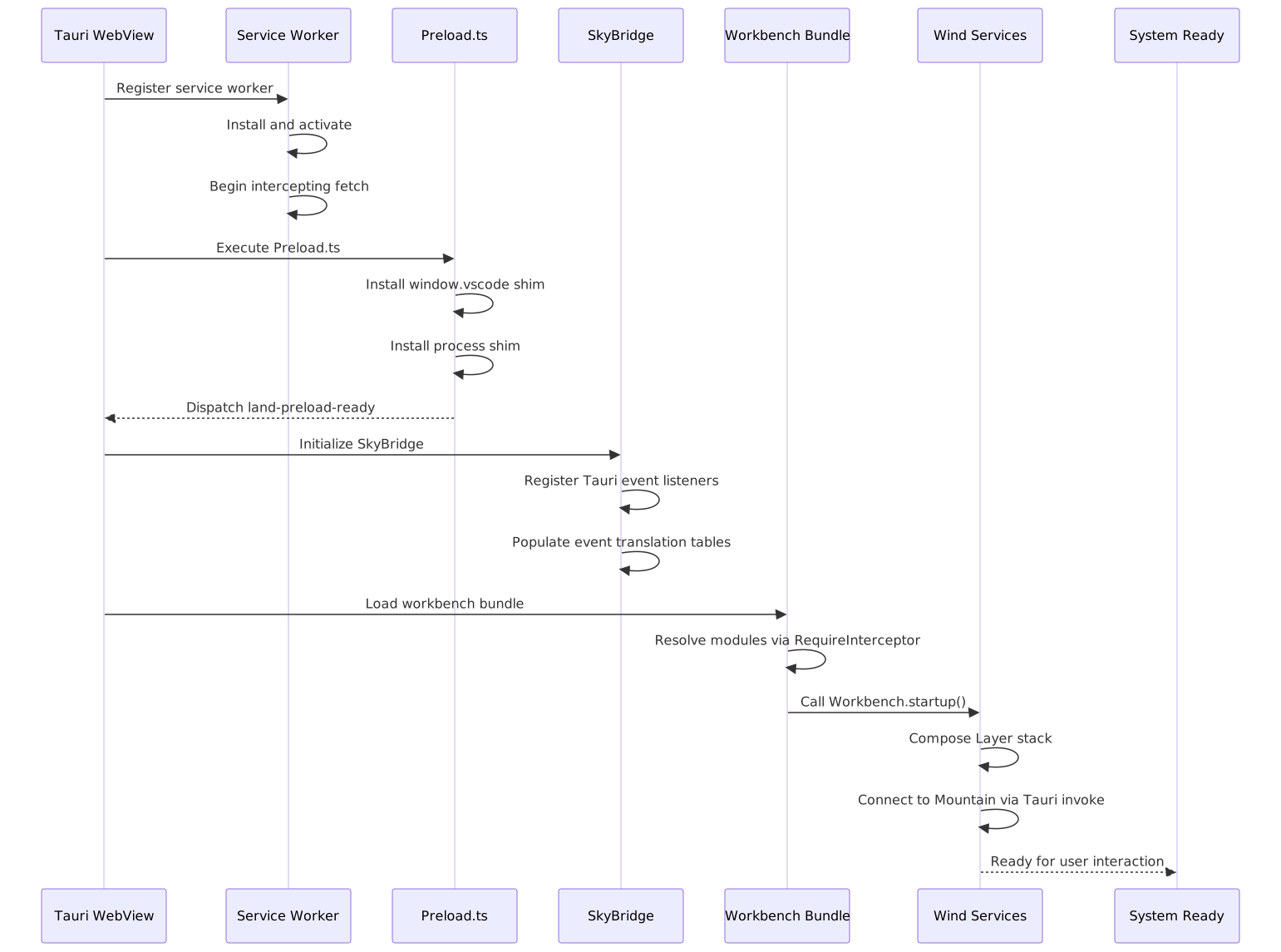
Polyfill Lifecycle 🔄
The startup sequence coordinates all polyfill layers:
 ### Polyfill Disable Flag
The Disable environment variable can be set to true to bypass all polyfill layers, useful for diagnosing polyfill-related issues:
Disable=true- All polyfills skippedDisable=false(default) - Normal polyfill installationDisable=preload- Skip only Preload shimDisable=bridge- Skip onlySkyBridge
Global Namespace Cleanup 🧹
After all shims are installed and the workbench is loaded, the Preload shim removes temporary globals to avoid polluting the workbench’s global namespace:
// After shim installation
delete (window as any).__land_preload_tmp;
delete (window as any).__land_polyfill_cache;
Only essential globals remain on window.vscode and globalThis.__LandTiers.
Project Maintainers: Source Open (Source/[email protected]) | GitHub Repository | Report an Issue
See Also
- 🟠 Low-Level Shim - Engine-level prototype hooks
- 🔵 Coverage / Telemetry - Application-level service routing