
Workflows
Running Extension Tests
How the Extension Development Host model spawns a second isolated Mountain+Cocoon pair and lets the test runner remote-control the main editor window.
⚠️ Workflow Status: The conceptual test runner architecture described here may differ from the current implementation. For the actual implementation, refer to the
Element/Mountain/Source/Environment/TestProvider/module andElement/Cocoon/Source/Services/Extension.tsfor extension activation.
Extension tests in Land use the same Extension Development Host model as VS Code: a second, fully isolated Mountain+Cocoon pair is spawned specifically to run the test suite. The test Cocoon instance does not start a normal extension host - instead it executes the test runner script directly. The key architectural detail is that require('vscode') inside the test files connects back to the original Mountain instance, so tests drive the real editor UI rather than a headless stub.
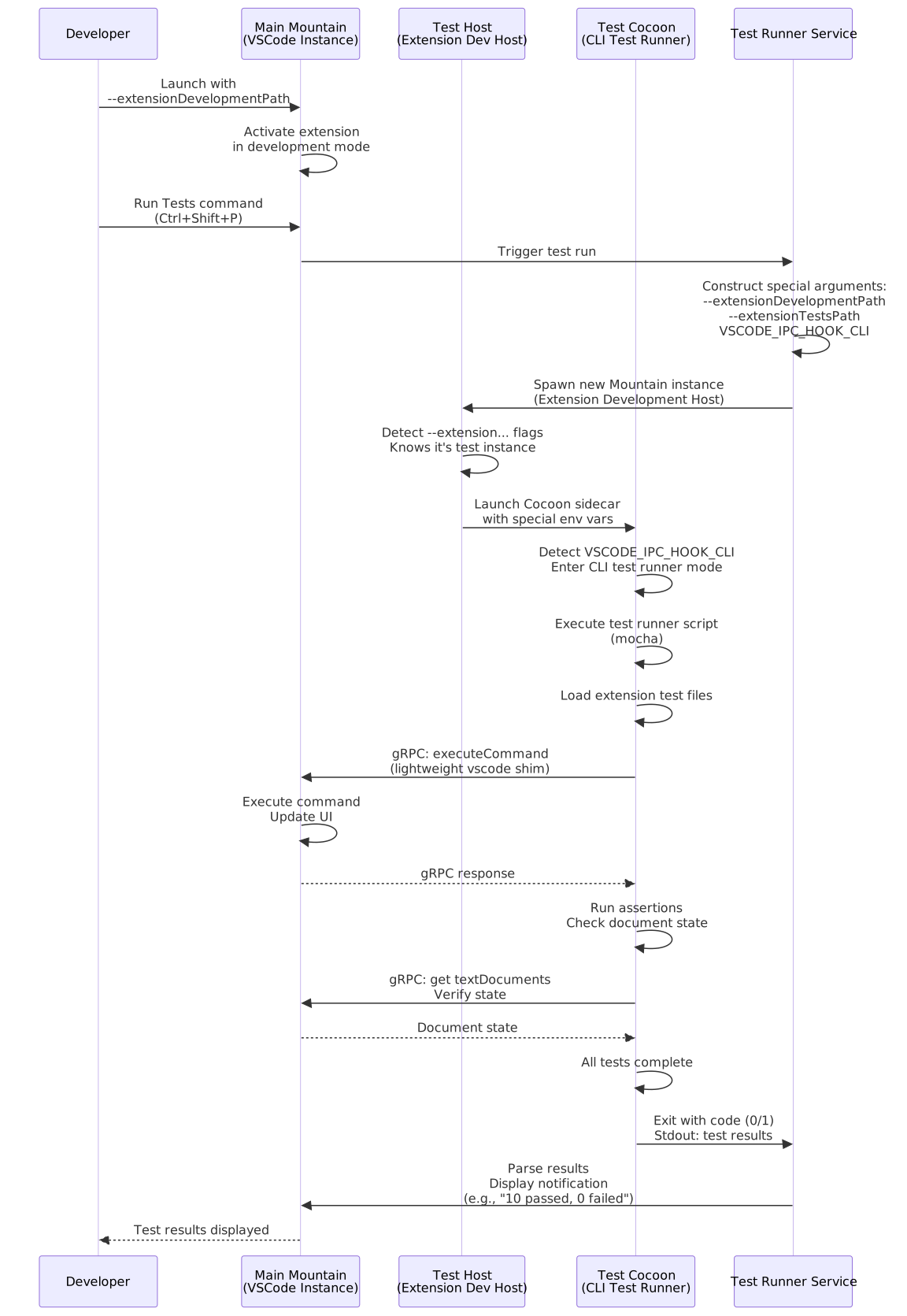 ## Phase 1 - Development mode launch
Extension manifest. The extension being developed includes a
"test"script in itspackage.json, for example:"test": "node ./test/runTest.js". The extension also contributes a command- e.g.
"command": "my-extension.runTests"- that acts as the test runner entry point.
- e.g.
Launch with dev path. The developer launches Mountain with a special flag pointing to the extension under development:
mountain --extensionDevelopmentPath /path/to/my-extensionExtension activation. Cocoon’s
ExtensionHostactivates the extension in development mode. The extension’sactivate()function runs and registers its commands, providers, and test runner entry point in the main window.
Phase 2 - Initiating the test run (Wind → Mountain)
User action. The developer opens the Command Palette (
Ctrl+Shift+P) and executes a command such as “Run Tests”. Mountain’s Test Runner Service receives the command and prepares to launch a second, separate instance of the application.Construct arguments. The Test Runner Service constructs a specialised set of arguments and environment variables for the new instance:
--extensionDevelopmentPath- path to the extension under test.--extensionTestsPath- path to the test runner entry script (e.g.out/test/suite/index.js).VSCODE_IPC_HOOK_CLI- environment variable that signals CLI test runner mode to Cocoon.
Spawn the test host. The Test Runner Service spawns a new Mountain process with these arguments. This second instance is the Extension Development Host.
Phase 3 - Test host startup (Mountain test → Cocoon test)
Detection. The new Mountain instance starts up, detects the
--extension...flags, and knows it is a test host. It launches its own Cocoon sidecar, forwarding the special environment variables includingVSCODE_IPC_HOOK_CLI.Test mode activation. The test Cocoon instance starts. Its bootstrap logic detects
VSCODE_IPC_HOOK_CLI. This tells it not to run as a normal extension host, but as a special CLI test runner. It does not bind the normal gRPC RPCServer, does not wait for aninitExtensionHosthandshake, and does not activate extensions in the standard way.Execute test runner script. Instead of starting the extension host, the test Cocoon process
requires and executes the script specified by--extensionTestsPath. This script is typically a Mocha runner entry point that discovers and loads the extension’s test files.Mocha execution. The Mocha runner starts, loads the extension’s test files (e.g.
my-extension.test.js), and begins executing tests.
Phase 4 - Remote control of the main window (Cocoon test → Mountain main)
Lightweight vscode shim. Each test file imports the
vscodemodule:import * as assert from "assert"; import * as vscode from "vscode"; test("My Extension Feature", async () => { await vscode.commands.executeCommand("my-extension.doSomething"); const document = vscode.workspace.textDocuments[0]; assert.strictEqual(document.getText(), "Expected Result"); });A lightweight
RequireInterceptorintercepts therequire('vscode')/import * as vscodecall. Instead of returning the normal Cocoon shim, it returns a thin client that connects back to the original Mountain instance’s gRPC server - the one the developer is looking at.gRPC command execution. When a test calls
vscode.commands.executeCommand(...), the thin client sends a gRPC request to the main Mountain instance. Main Mountain executes the command exactly as if it had come from its own Cocoon sidecar: files open, the UI updates, and the result is returned via gRPC response to the test process.State assertions. The
executeCommandpromise resolves in the test Cocoon instance. Subsequent assertions read state from the main instance the same way:const doc = vscode.workspace.textDocuments[0]; assert.strictEqual(doc.getText(), "Expected Result");Each property access (
vscode.workspace.textDocuments) is a gRPC call to main Mountain. The assert checks the live state of the editor window.
Phase 5 - Result reporting (Cocoon test → Mountain main → Wind)
Completion. The Mocha runner completes all tests. It aggregates the number of passes and failures, prints a summary to stdout, and exits with a specific exit code (e.g.
0for success,1for failure).Parse and notify. The main Mountain’s Test Runner Service was monitoring the test process’s stdout and exit code throughout. It parses the test results from the output and displays a notification in the main window:
Tests finished: 10 passed, 0 failedCleanup. The Extension Development Host process exits. All resources allocated in
AppStateof the test Mountain instance are released automatically when the process terminates.
Important
Because tests drive the main Mountain instance, they execute in the same process space as the live editor. A test that opens a file or modifies editor state will visibly change the developer’s window. Tests must clean up after themselves - close documents, revert changes - or subsequent test runs may start with unexpected editor state.