
Workflows
Invoking a Language Feature Hover Provider
How a user hover in Monaco triggers a round-trip through Wind, Mountain IPC, a Cocoon gRPC call to the registered extension provider, and back.
Hover Provider Invocation
A hover provider demonstrates the full five-element request cycle: registration flows from Cocoon to Mountain at activation time, then each live hover request flows Sky → Wind → Mountain → Cocoon → extension → back the same way. Mountain acts as the broker that maps language selectors to provider handles and routes requests to the correct sidecar.
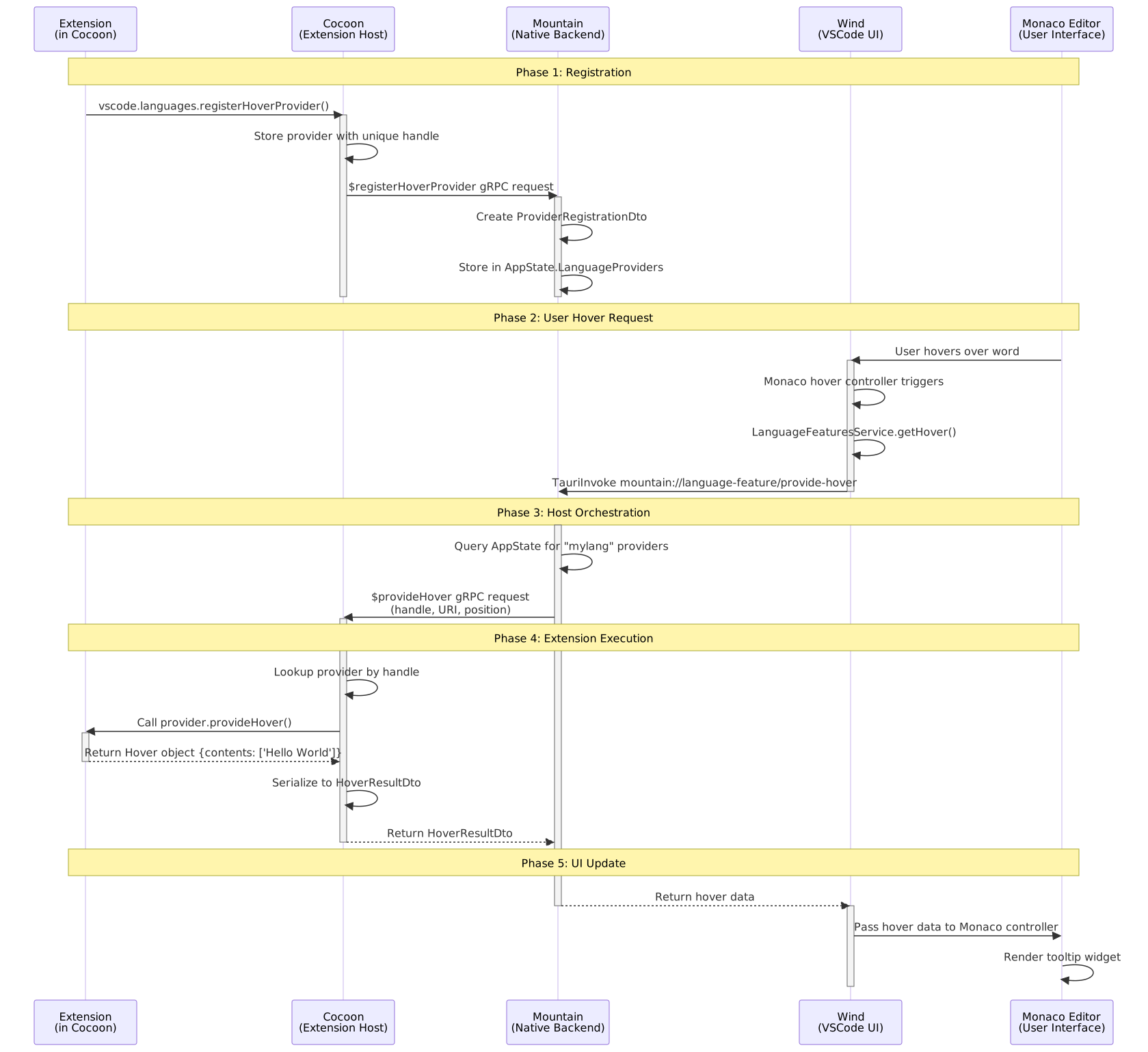 ---
---Phase 1 - Extension registration (Cocoon → Mountain)
The extension is activated by Cocoon. Its
activate()function runs and calls:vscode.languages.registerHoverProvider("mylang", provider);Cocoon’s
LanguageFeaturesProviderstores theproviderobject in a local handle map under a unique handle (e.g.123) and sends a$registerHoverProvidergRPC request to Mountain. The request carries the handle, the language selector ("mylang"), and the owning extension ID.Mountain’s Vine gRPC server receives the request and dispatches it through the
trackmodule toLanguageFeatureProvider.RegisterProvider().Registration.register_provider()creates aProviderRegistrationDto(handle123, typeHover, language"mylang", sidecar"cocoon-main") and stores it inAppState.LanguageProviders. Mountain now knows which sidecar owns which provider for which language.
| Step | Component | File |
|---|---|---|
| 1 | Cocoon | Cocoon/src/Core/ExtensionHost.ts |
| 2 | Cocoon | Cocoon/src/Service/LanguageFeatures.ts |
| 3 | Mountain | Mountain/Source/Vine/server/MountainVineGrpcService.rs |
| 4 | Mountain | Mountain/Source/Environment/LanguageFeatureProvider/Registration.rs |
Phase 2 - User hover request (Sky → Wind → Mountain)
The user moves the mouse over a symbol in an editor showing a
"mylang"file. Monaco’s internal hover controller fires and callsILanguageFeaturesService.getHover()in Wind.The service constructs an Effect that calls:
TauriInvoke("mountain://language-feature/provide-hover", {
	uri,
	position,
});
This crosses the webview boundary and reaches Mountain’s IPC dispatcher.
| Step | Component | File |
|---|---|---|
| 5 | Wind | Wind/src/vs/editor/common/services/languageFeaturesService.ts |
| 6 | Wind | Wind/src/vs/platform/editor/common/editorService.ts |
Phase 3 - Mountain orchestrates the request (Mountain → Cocoon)
Mountain’s
ProtocolLogic.HandleCustomUriSchemeRequest()receives themountain://language-feature/provide-hoverrequest and dispatches it to thetrackmodule, which creates theLanguageFeature::ProvideHovereffect.LanguageFeatureProvider.ProvideHover()queriesAppState.LanguageProvidersfor all registered hover providers matching the document’s language ("mylang"). It finds handle123belonging to"cocoon-main".Mountain sends a
$provideHovergRPC request to Cocoon with the document URI, cursor position, and provider handle123.
| Step | Component | File |
|---|---|---|
| 7 | Mountain | Mountain/Source/handlers/protocol/ProtocolLogic.rs |
| 8-9 | Mountain | Mountain/Source/Environment/LanguageFeatureProvider/FeatureMethods.rs |
Phase 4 - Extension execution (Cocoon)
Cocoon’s gRPC server (
Cocoon/src/Service/Ipc/Server.ts) receives the$provideHoverrequest and dispatches it to the language provider handler, which looks up handle123in its local map and retrieves the originalproviderobject.The handler calls:
provider.provideHover(document, position, token);The extension’s code executes and returns a
Hoverobject, e.g.{ contents: ["Hello World"] }.The handler serialises the result into a
HoverResultDtoviaTypeConverterand returns it to Mountain as the gRPC response.
| Step | Component | File |
|---|---|---|
| 10 | Cocoon | Cocoon/src/Service/Ipc/Server.ts |
| 11-12 | Cocoon | Cocoon/src/Service/LanguageFeatures/TypeConverter.ts |
Phase 5 - Result reaches the UI (Mountain → Wind → Sky)
Mountain receives the
HoverResultDto, serialises it, and sends it back as the response to the originalTauriInvokecall from step 6.Wind’s
getHoverEffect resolves. The service passes theHoverdata to Monaco’s hover controller.Monaco renders the tooltip widget on screen. The user sees the hover card.
| Step | Component | File |
|---|---|---|
| 13 | Mountain | Mountain/Source/Environment/LanguageFeatureProvider/FeatureMethods.rs |
| 14 | Wind | Wind/src/vs/editor/common/services/languageFeaturesService.ts |
| 15 | Monaco | Monaco Editor (embedded in Sky webview) |
Resolve methods
Two-phase providers return a partial result from $provide* and then expect a $resolve* call to fill in expensive-to-compute fields. The following resolve methods are fully routed through FeatureMethods.rs via the same InvokeLanguageProvider dispatch path and return results to the caller rather than being dropped:
$resolveCodeAction$resolveCompletionItem$resolveHover$resolveInlayHint$resolveDocumentLink$resolveWorkspaceSymbol
Inline completions
The same gRPC dispatch path handles inline completion providers (used by Copilot and similar AI tools). When an extension calls vscode.languages.registerInlineCompletionItemProvider(), the handle is stored in AppState.LanguageProviders under the InlineCompletion type. Sky registers the provider with ILanguageFeaturesService.inlineCompletionsProvider via the sky://language/register-inline-completions bridge channel. When the editor requests completions, Mountain routes language:provideInlineCompletions through the same LanguageFeatureProviderRegistry trait and gRPC path as hover, returning InlineCompletionItem[] to the editor.
Important
The same registration and dispatch pattern applies to every language feature ($registerCompletionItemProvider, $registerDefinitionProvider, etc.). The only difference is the gRPC method name and the DTO shape. Mountain always stores handle→sidecar mappings in AppState.LanguageProviders and routes each $provide* call to the correct sidecar at request time.